DJPROCODE
For every developer who dared to think differently —
who saw code not as a tool, but as a language of creation.
This book is for you."
Table of Contents
INTRODUCTION
Introduction to DJPROCODE
DJPROCODE is a next-generation programming language engineered to bridge the gap between human readability, compiler performance, and artificial intelligence integration. In an era dominated by high-level languages like Python and low-level systems like C++, developers often face a trade-off between writing speed and execution efficiency. DJPROCODE is designed to provide an expressive, clean syntax that is easy for humans to read and write, while translating into highly optimized Virtual Machine bytecode that runs inside the DJVM (DJ Virtual Machine).
One of the key design philosophies of DJPROCODE is structured minimalism. The language does not rely on braces or complex indentation rules. Instead, it utilizes clean keyword boundaries like start and stop to define execution blocks. This guarantees code predictability and prevents common errors like indentation misalignment. Additionally, DJPROCODE features native support for type checking, constants, and built-in standard libraries, making it a robust language for building software, scripting, and automation.
Historically, languages were built with CPU instruction matching in mind. Today, they must be built with AI code generation, human developers, and cross-platform runtime environments in mind. DJPROCODE achieves this by choosing english-like words for arithmetic and comparisons, which aligns closely with how we think about algorithms logically.
Key Advantages
- Predictable block boundaries using explicit start/stop keywords.
- Human-readable logical operators (plus, minus, same, reverse) instead of symbols.
- Cross-platform execution via the lightweight DJVM bytecode interpreter.
Common Pitfalls & Errors
- Attempting to write code outside the global start/stop block boundaries.
- Using braces {} or semicolons ; which are not recognized by the parser.
Review Exercises
- Explain why DJPROCODE uses keywords like 'start' and 'stop' instead of curly braces.
- What is the role of the DJVM in executing DJPROCODE programs?
History & Philosophy
DJPROCODE was created in 2026 by Debojit Das as a research project to explore human-centric language design. Over decades, programming languages have accumulated historical baggage, complex syntax specifications, and visual noise. The objective of DJPROCODE was to strip away all visual clutter—no semi-colons, no parentheses for control flow, no curly braces, and no cryptic mathematical symbols like != or &&. Instead, DJPROCODE replaces them with clean English keywords like notsame and both.
The core tenets of DJPROCODE are:
1. Readability is first: Code should read like structured logic. If a non-programmer can understand the flow of the script, the language has succeeded.
2. Portability: Write once, run anywhere. By compiling source code into a custom, compact bytecode format, DJPROCODE files run instantly on any machine that hosts the DJVM.
3. Native Integration: Out-of-the-box support for advanced packages including graphics, math, and AI capabilities.
The design of DJPROCODE draws inspiration from Python's clean structure, Pascal's explicit boundaries, and the robust virtual machine model of Java. The result is a language that feels both familiar and refreshingly simple, allowing developers to focus on architectural logic rather than syntax details.
Key Advantages
- Expressive logical structures that minimize semantic errors.
- Engineered from scratch to be easily parsed and generated by AI agents.
- Lightweight ecosystem with zero configuration requirements.
Common Pitfalls & Errors
- Comparing DJPROCODE to legacy language paradigms and assuming symbols are needed.
- Misunderstanding the VM-based runtime model.
Review Exercises
- Summarize the three core tenets of DJPROCODE.
- How does English-like operator naming benefit beginner programmers?
Installing DJPROCODE
Getting started with DJPROCODE requires installing the DJPROCODE SDK. The SDK comes with the compiler toolchain, the DJVM interpreter, and the DJStudio interactive environment. The platform is fully cross-platform and runs natively on Windows, macOS, and Linux.
Installation Steps:
1. Download the installer bundle from the official release page.
2. Extract the archive into a directory on your system, such as E:\DJPROCODE on Windows or /usr/local/djprocode on Unix-like operating systems.
3. Add the bin directory within the SDK path to your system's PATH environment variable. This allows running the compiler from any terminal using the command djprocode.
4. Verify the installation by running djprocode --version in your terminal. You should see version details like 'DJPROCODE v2.0 (DJVM)' printed to standard output.
Additionally, the SDK includes editor extensions for popular development environments, including Visual Studio Code and JetBrains IDEs. These extensions provide syntax highlighting, code linting, and direct debugging hooks, enabling a premium development experience.
Key Advantages
- Simple directory extraction installation with zero external dependencies.
- Comes bundled with a fully integrated development console (DJStudio).
- Native IDE support for VS Code and Visual Studio 2022 out of the box.
Common Pitfalls & Errors
- Forgetting to add the bin directory to your environment variables, leading to 'command not found' errors.
- Running scripts using the standard Python interpreter instead of the djprocode runtime.
Review Exercises
- Walk through the steps to add the DJPROCODE bin directory to the Windows PATH.
- What command is used to verify that the compiler is installed correctly?
Your First Program
Now that the environment is set up, let's write our first program. In DJPROCODE, every program is contained within a global entry block that begins with the keyword start and ends with stop. Inside this block, we write instructions that are executed sequentially by the Virtual Machine.
To output text to the screen, we use the display keyword followed by a string literal. String literals are enclosed in double quotes. Comments are written starting with two forward slashes (//) and are ignored by the compiler, allowing developers to annotate their code for future reference.
To run this code, write it into a text file named hello.djpc, and then run it in your terminal:
djprocode hello.djpc
The compiler will compile the file to bytecode, run it via the VM, and you will see 'Hello, World!' printed on the screen. Let's see the code and compile traces.
DJPROCODE Source Implementation
start
    // Print a welcome message
    display "Hello, World!"
stop
Python Equivalency Code
# Print a welcome message
print("Hello, World!")
Key Advantages
- Clean and minimal syntax with zero visual boilerplate.
- Simple single-keyword output command (display).
- Comments are automatically ignored during lexical analysis.
Common Pitfalls & Errors
- Forgetting to wrap the string value in double quotes.
- Omitting the 'start' or 'stop' keywords, causing compilation failures.
Compilation & Syntax Analysis Tracing
To understand exactly how the compiler parses and processes this chapter's code, review the analysis structures below:
1. Lexer Tokens Table
The lexer breaks the code characters into the following token sequence:
| Index | Token Type | Lexeme Value | Line |
|---|---|---|---|
| 0 | KEYWORD | 'start' | 1 |
| 1 | KEYWORD | 'display' | 3 |
| 2 | STRING | 'Hello, World!' | 3 |
| 3 | KEYWORD | 'stop' | 4 |
| 4 | EOF | None | 4 |
2. Abstract Syntax Tree (AST)
The parser organizes tokens into the following logical tree structure:
ProgramNode
└── stmt: DisplayNode
    └── expr: LiteralNode
        ├── value: 'Hello, World!'
        └── type: 'word'
3. Compiled Bytecode Opcodes
The compiler generates the following DJVM assembly instructions:
| Instruction Address | Bytecode Opcode | Instruction Argument |
|---|---|---|
| 0 | __firstlineno__ | 'Hello, World!' |
| 1 | DISPLAY | None |
Review Exercises
- Create a program that prints your name and your city on two separate lines.
- Add a comment explaining what the program does.
CORE LANGUAGE FUNDAMENTALS
Program Structure
The structure of a DJPROCODE program is designed to be highly structured and uniform. Unlike languages like C++, Java, or JavaScript that use curly braces {} to group statements, or Python that uses strict tab/space indentation, DJPROCODE uses block keywords. An execution block always has an opening keyword (like start, check, loop, create) and is closed by the keyword stop.
This explicit boundaries structure provides major advantages:
1. Compiler safety: The parser knows exactly where a statement block ends, making parser error recovery extremely reliable.
2. Indentation freedom: While it is highly recommended to indent statements inside blocks for readability, it is not syntax-critical, unlike Python. Your program will compile and run correctly even if it is written without indents.
3. Clean look: The elimination of braces and semi-colons reduces visual noise, allowing the developer's eyes to focus on actual logic.
Every statement in DJPROCODE is written on a new line. Semicolons are not used. You can write inline comments anywhere using //, which helps document variable purposes and complex flows.
DJPROCODE Source Implementation
start
    display "This is the start"
    display "Doing some work..."
stop
Python Equivalency Code
print("This is the start")
print("Doing some work...")
Key Advantages
- Code blocks are visually clean and easy to separate.
- Compiler detects missing block end keywords instantly.
- Indentation is recommended but not syntax-critical.
Common Pitfalls & Errors
- Writing multiple commands on a single line without separating them by a newline.
- Nesting multiple blocks and forgetting to balance each opening keyword with a corresponding stop.
Compilation & Syntax Analysis Tracing
To understand exactly how the compiler parses and processes this chapter's code, review the analysis structures below:
1. Lexer Tokens Table
The lexer breaks the code characters into the following token sequence:
| Index | Token Type | Lexeme Value | Line |
|---|---|---|---|
| 0 | KEYWORD | 'start' | 1 |
| 1 | KEYWORD | 'display' | 2 |
| 2 | STRING | 'This is the start' | 2 |
| 3 | KEYWORD | 'display' | 3 |
| 4 | STRING | 'Doing some work...' | 3 |
| 5 | KEYWORD | 'stop' | 4 |
| 6 | EOF | None | 4 |
2. Abstract Syntax Tree (AST)
The parser organizes tokens into the following logical tree structure:
ProgramNode
├── stmt: DisplayNode
│   └── expr: LiteralNode
│       ├── value: 'This is the start'
│       └── type: 'word'
└── stmt: DisplayNode
    └── expr: LiteralNode
        ├── value: 'Doing some work...'
        └── type: 'word'
3. Compiled Bytecode Opcodes
The compiler generates the following DJVM assembly instructions:
| Instruction Address | Bytecode Opcode | Instruction Argument |
|---|---|---|
| 0 | __firstlineno__ | 'This is the start' |
| 1 | DISPLAY | None |
| 2 | __firstlineno__ | 'Doing some work...' |
| 3 | DISPLAY | None |
Review Exercises
- Write a program that contains nested blocks using the check statement and verify they all terminate with stop.
- What happens if you run a script that lacks the stop keyword for start?
Data Types
DJPROCODE is a typed language that supports six primitive and collection data types. Understanding these types is essential for managing memory and data transformations:
1. number: Represents integer values (positive, negative, or zero). Examples: 42, -10, 0.
2. point: Represents floating-point decimal numbers. Examples: 3.14159, -0.001, 100.0.
3. word: Represents textual data (strings). String literals are enclosed in double quotes. Example: "DJPROCODE".
4. logic: Represents boolean truth values. It has two literals: yes (true) and no (false).
5. group: Represents lists or arrays of values. These are indexed collections. Example: [1, 2, 3].
6. nothing: Represents the null/empty type. It has a single literal: nothing.
When declaring variables, you can explicitly define their type. This ensures that the virtual machine checks values and prevents illegal operations, such as adding a word to a number without explicit conversion.
DJPROCODE Source Implementation
start
    store x as number = 42
    store y as point = 3.14
    store s as word = "Hello"
    store b as logic = yes
    store g as group = [1, 2, 3]
    store n as nothing = nothing
stop
Python Equivalency Code
x: int = 42
y: float = 3.14
s: str = "Hello"
b: bool = True
g: list = [1, 2, 3]
n: None = None
Key Advantages
- Explicit typing guarantees type safety during execution.
- Built-in list data type (group) handles arrays natively.
- Clear representation of empty values (nothing) prevents undefined reference crashes.
Common Pitfalls & Errors
- Assigning a point value to a variable declared as a number, causing compile-time checks to raise warnings.
- Writing boolean literals as true/false instead of yes/no.
Compilation & Syntax Analysis Tracing
To understand exactly how the compiler parses and processes this chapter's code, review the analysis structures below:
1. Lexer Tokens Table
The lexer breaks the code characters into the following token sequence:
| Index | Token Type | Lexeme Value | Line |
|---|---|---|---|
| 0 | KEYWORD | 'start' | 1 |
| 1 | KEYWORD | 'store' | 2 |
| 2 | IDENTIFIER | 'x' | 2 |
| 3 | KEYWORD | 'as' | 2 |
| 4 | KEYWORD | 'number' | 2 |
| 5 | ASSIGN | None | 2 |
| 6 | NUMBER | 42 | 2 |
| 7 | KEYWORD | 'store' | 3 |
| 8 | IDENTIFIER | 'y' | 3 |
| 9 | KEYWORD | 'as' | 3 |
| 10 | KEYWORD | 'point' | 3 |
| 11 | ASSIGN | None | 3 |
| 12 | POINT | 3.14 | 3 |
| 13 | KEYWORD | 'store' | 4 |
| 14 | IDENTIFIER | 's' | 4 |
| 15 | KEYWORD | 'as' | 4 |
| 16 | KEYWORD | 'word' | 4 |
| 17 | ASSIGN | None | 4 |
| 18 | STRING | 'Hello' | 4 |
| 19 | KEYWORD | 'store' | 5 |
| 20 | IDENTIFIER | 'b' | 5 |
| 21 | KEYWORD | 'as' | 5 |
| 22 | KEYWORD | 'logic' | 5 |
| 23 | ASSIGN | None | 5 |
| 24 | KEYWORD | 'yes' | 5 |
| 25 | KEYWORD | 'store' | 6 |
| 26 | IDENTIFIER | 'g' | 6 |
| 27 | KEYWORD | 'as' | 6 |
| 28 | KEYWORD | 'group' | 6 |
| 29 | ASSIGN | None | 6 |
| 30 | LBRACKET | None | 6 |
| 31 | NUMBER | 1 | 6 |
| 32 | COMMA | None | 6 |
| 33 | NUMBER | 2 | 6 |
| 34 | COMMA | None | 6 |
| 35 | NUMBER | 3 | 6 |
| 36 | RBRACKET | None | 6 |
| 37 | KEYWORD | 'store' | 7 |
| 38 | IDENTIFIER | 'n' | 7 |
| 39 | KEYWORD | 'as' | 7 |
| 40 | KEYWORD | 'nothing' | 7 |
| 41 | ASSIGN | None | 7 |
| 42 | KEYWORD | 'nothing' | 7 |
| 43 | KEYWORD | 'stop' | 8 |
| 44 | EOF | None | 8 |
2. Abstract Syntax Tree (AST)
The parser organizes tokens into the following logical tree structure:
ProgramNode
├── stmt: StoreNode
│   ├── expr: LiteralNode
│   │   ├── value: 42
│   │   └── type: 'number'
│   └── datatype: 'number'
├── stmt: StoreNode
│   ├── expr: LiteralNode
│   │   ├── value: 3.14
│   │   └── type: 'point'
│   └── datatype: 'point'
├── stmt: StoreNode
│   ├── expr: LiteralNode
│   │   ├── value: 'Hello'
│   │   └── type: 'word'
│   └── datatype: 'word'
├── stmt: StoreNode
│   ├── expr: LiteralNode
│   │   ├── value: True
│   │   └── type: 'logic'
│   └── datatype: 'logic'
├── stmt: StoreNode
│   ├── expr: LiteralNode
│   │   ├── value: [, , ]
│   │   └── type: 'group'
│   └── datatype: 'group'
└── stmt: StoreNode
    ├── expr: LiteralNode
    │   └── type: 'nothing'
    └── datatype: 'nothing'
3. Compiled Bytecode Opcodes
The compiler generates the following DJVM assembly instructions:
| Instruction Address | Bytecode Opcode | Instruction Argument |
|---|---|---|
| 0 | __firstlineno__ | 42 |
| 1 | STORE_VAR | ('x', 'number') |
| 2 | __firstlineno__ | 3.14 |
| 3 | STORE_VAR | ('y', 'point') |
| 4 | __firstlineno__ | 'Hello' |
| 5 | STORE_VAR | ('s', 'word') |
| 6 | __firstlineno__ | True |
| 7 | STORE_VAR | ('b', 'logic') |
| 8 | __firstlineno__ | 1 |
| 9 | __firstlineno__ | 2 |
| 10 | __firstlineno__ | 3 |
| 11 | BUILD_LIST | 3 |
| 12 | STORE_VAR | ('g', 'group') |
| 13 | __firstlineno__ | None |
| 14 | STORE_VAR | ('n', 'nothing') |
Review Exercises
- Declare a variable of type logic and initialize it to yes.
- Create a list containing three points, representing coordinate coordinates.
Variables
Variables are names that bind to values, allowing programs to store and mutate state during execution. In DJPROCODE, variables are declared using the store keyword. Variables can be declared with a strict type or implicitly typed based on the value assigned to them.
Syntax:
store (Strict type declaration)
store (Implicit type declaration)
Once a variable is declared, you can update its value using the same store keyword followed by the new value. The compiler distinguishes declaration from reassignment by scanning the scope. If the variable name already exists in the environment, it performs an update.
Variable names must start with a letter or underscore, followed by letters, numbers, or underscores. They are case-sensitive, meaning myVar and myvar are treated as two separate variables.
DJPROCODE Source Implementation
start
    store score as number = 10
    display score
    store score = 25
    display score
stop
Python Equivalency Code
score: int = 10
print(score)
score = 25
print(score)
Key Advantages
- Clear variable binding syntax using the store keyword.
- Flexible support for both static explicit typing and implicit dynamic typing.
- Scoped environments prevent namespace collisions.
Common Pitfalls & Errors
- Updating a variable using the equal sign directly without the store keyword (e.g. x = 20), which throws a syntax error.
- Re-declaring a variable with a different type in the same scope.
Compilation & Syntax Analysis Tracing
To understand exactly how the compiler parses and processes this chapter's code, review the analysis structures below:
1. Lexer Tokens Table
The lexer breaks the code characters into the following token sequence:
| Index | Token Type | Lexeme Value | Line |
|---|---|---|---|
| 0 | KEYWORD | 'start' | 1 |
| 1 | KEYWORD | 'store' | 2 |
| 2 | IDENTIFIER | 'score' | 2 |
| 3 | KEYWORD | 'as' | 2 |
| 4 | KEYWORD | 'number' | 2 |
| 5 | ASSIGN | None | 2 |
| 6 | NUMBER | 10 | 2 |
| 7 | KEYWORD | 'display' | 3 |
| 8 | IDENTIFIER | 'score' | 3 |
| 9 | KEYWORD | 'store' | 4 |
| 10 | IDENTIFIER | 'score' | 4 |
| 11 | ASSIGN | None | 4 |
| 12 | NUMBER | 25 | 4 |
| 13 | KEYWORD | 'display' | 5 |
| 14 | IDENTIFIER | 'score' | 5 |
| 15 | KEYWORD | 'stop' | 6 |
| 16 | EOF | None | 6 |
2. Abstract Syntax Tree (AST)
The parser organizes tokens into the following logical tree structure:
ProgramNode
├── stmt: StoreNode
│   ├── expr: LiteralNode
│   │   ├── value: 10
│   │   └── type: 'number'
│   └── datatype: 'number'
├── stmt: DisplayNode
│   └── expr: VarAccessNode
│       └── var_name: 'score'
├── stmt: AssignNode
│   └── expr: LiteralNode
│       ├── value: 25
│       └── type: 'number'
└── stmt: DisplayNode
    └── expr: VarAccessNode
        └── var_name: 'score'
3. Compiled Bytecode Opcodes
The compiler generates the following DJVM assembly instructions:
| Instruction Address | Bytecode Opcode | Instruction Argument |
|---|---|---|
| 0 | __firstlineno__ | 10 |
| 1 | STORE_VAR | ('score', 'number') |
| 2 | MOVE_VAR | 'score' |
| 3 | DISPLAY | None |
| 4 | __firstlineno__ | 25 |
| 5 | STORE_VAR | ('score', None) |
| 6 | MOVE_VAR | 'score' |
| 7 | DISPLAY | None |
Review Exercises
- Declare a typed word variable, display it, then update its value and display it again.
- Write a script that swaps the values of two variables.
Constants (Fixed Variables)
In software development, some values should never change during program execution. Examples include mathematical constants like Pi, configuration settings, or system keys. In DJPROCODE, these values are declared as constants using the fixed keyword instead of store.
Syntax:
fixed
When the compiler encounters a fixed declaration, it marks the variable name as immutable. Any subsequent attempt to assign a new value to this constant will cause the compiler to raise a compile-time warning or the VM to raise a runtime exception.
Using constants has multiple benefits:
1. Safety: Prevents accidental modifications to critical data.
2. Readability: Signifies to other developers that this value is static and constant.
3. Optimization: The compiler can optimize access paths for read-only values.
DJPROCODE Source Implementation
start
    fixed PI as point = 3.14159
    display PI
stop
Python Equivalency Code
PI = 3.14159 # Python does not support true constants
print(PI)
Key Advantages
- Explicit language-level support for immutability.
- Prevents accidental modification errors in large-scale applications.
- Enhances code documentation by marking constant parameters.
Common Pitfalls & Errors
- Attempting to write 'store PI = 3.14' on a constant declared with fixed.
- Omitting the type declaration in a fixed statement, which is highly recommended for safety.
Compilation & Syntax Analysis Tracing
To understand exactly how the compiler parses and processes this chapter's code, review the analysis structures below:
1. Lexer Tokens Table
The lexer breaks the code characters into the following token sequence:
| Index | Token Type | Lexeme Value | Line |
|---|---|---|---|
| 0 | KEYWORD | 'start' | 1 |
| 1 | KEYWORD | 'fixed' | 2 |
| 2 | IDENTIFIER | 'PI' | 2 |
| 3 | KEYWORD | 'as' | 2 |
| 4 | KEYWORD | 'point' | 2 |
| 5 | ASSIGN | None | 2 |
| 6 | POINT | 3.14159 | 2 |
| 7 | KEYWORD | 'display' | 3 |
| 8 | IDENTIFIER | 'PI' | 3 |
| 9 | KEYWORD | 'stop' | 4 |
| 10 | EOF | None | 4 |
2. Abstract Syntax Tree (AST)
The parser organizes tokens into the following logical tree structure:
ProgramNode
├── stmt: StoreNode
│   ├── expr: LiteralNode
│   │   ├── value: 3.14159
│   │   └── type: 'point'
│   └── datatype: 'point'
└── stmt: DisplayNode
    └── expr: VarAccessNode
        └── var_name: 'PI'
3. Compiled Bytecode Opcodes
The compiler generates the following DJVM assembly instructions:
| Instruction Address | Bytecode Opcode | Instruction Argument |
|---|---|---|
| 0 | __firstlineno__ | 3.14159 |
| 1 | STORE_VAR | ('PI', 'point') |
| 2 | MOVE_VAR | 'PI' |
| 3 | DISPLAY | None |
Review Exercises
- Declare a fixed variable for the speed of light (299792458) as a number.
- Test what error is printed if you attempt to reassign this constant.
Operators
Operators are special keywords or symbols used to perform operations on variables and values. DJPROCODE deviates from C-style syntax by replacing mathematical symbols with clear, English keywords, which makes code read like logical statements.
Categories of Operators:
1. Arithmetic:
- plus: Addition or string concatenation.
- minus: Subtraction.
- into: Multiplication.
- by: Division.
- remain: Modulo (remainder of division).
2. Comparison:
- same: Equality check (==).
- notsame: Inequality check (!=).
- big: Greater than (>).
- small: Less than (<).
- bigsame: Greater than or equal (>=).
- smallsame: Less than or equal (<=).
3. Logical:
- both: Logical AND (&&).
- either: Logical OR (||).
- reverse: Logical NOT (!).
This syntax ensures that operations are easy to read and understand, even for non-technical users.
DJPROCODE Source Implementation
start
    store x = 10 plus 5
    store y = x into 2
    store b = y same 30
    display b
stop
Python Equivalency Code
x = 10 + 5
y = x * 2
b = y == 30
print(b)
Key Advantages
- Keywords are less cryptic than symbols, leading to clean code.
- String concatenation is naturally integrated into the plus operator.
- Full support for modulo arithmetic with the remain keyword.
Common Pitfalls & Errors
- Using symbol operators like +, *, == in expressions, which will throw syntax errors.
- Misunderstanding logical precedence between both and either.
Compilation & Syntax Analysis Tracing
To understand exactly how the compiler parses and processes this chapter's code, review the analysis structures below:
1. Lexer Tokens Table
The lexer breaks the code characters into the following token sequence:
| Index | Token Type | Lexeme Value | Line |
|---|---|---|---|
| 0 | KEYWORD | 'start' | 1 |
| 1 | KEYWORD | 'store' | 2 |
| 2 | IDENTIFIER | 'x' | 2 |
| 3 | ASSIGN | None | 2 |
| 4 | NUMBER | 10 | 2 |
| 5 | KEYWORD | 'plus' | 2 |
| 6 | NUMBER | 5 | 2 |
| 7 | KEYWORD | 'store' | 3 |
| 8 | IDENTIFIER | 'y' | 3 |
| 9 | ASSIGN | None | 3 |
| 10 | IDENTIFIER | 'x' | 3 |
| 11 | KEYWORD | 'into' | 3 |
| 12 | NUMBER | 2 | 3 |
| 13 | KEYWORD | 'store' | 4 |
| 14 | IDENTIFIER | 'b' | 4 |
| 15 | ASSIGN | None | 4 |
| 16 | IDENTIFIER | 'y' | 4 |
| 17 | KEYWORD | 'same' | 4 |
| 18 | NUMBER | 30 | 4 |
| 19 | KEYWORD | 'display' | 5 |
| 20 | IDENTIFIER | 'b' | 5 |
| 21 | KEYWORD | 'stop' | 6 |
| 22 | EOF | None | 6 |
2. Abstract Syntax Tree (AST)
The parser organizes tokens into the following logical tree structure:
ProgramNode
├── stmt: AssignNode
│   └── expr: BinOpNode
│       ├── left: LiteralNode
│       │   ├── value: 10
│       │   └── type: 'number'
│       └── right: LiteralNode
│           ├── value: 5
│           └── type: 'number'
├── stmt: AssignNode
│   └── expr: BinOpNode
│       ├── left: VarAccessNode
│       │   └── var_name: 'x'
│       └── right: LiteralNode
│           ├── value: 2
│           └── type: 'number'
├── stmt: AssignNode
│   └── expr: BinOpNode
│       ├── left: VarAccessNode
│       │   └── var_name: 'y'
│       └── right: LiteralNode
│           ├── value: 30
│           └── type: 'number'
└── stmt: DisplayNode
    └── expr: VarAccessNode
        └── var_name: 'b'
3. Compiled Bytecode Opcodes
The compiler generates the following DJVM assembly instructions:
| Instruction Address | Bytecode Opcode | Instruction Argument |
|---|---|---|
| 0 | __firstlineno__ | 10 |
| 1 | __firstlineno__ | 5 |
| 2 | BINARY_OP | 'plus' |
| 3 | STORE_VAR | ('x', None) |
| 4 | MOVE_VAR | 'x' |
| 5 | __firstlineno__ | 2 |
| 6 | BINARY_OP | 'into' |
| 7 | STORE_VAR | ('y', None) |
| 8 | MOVE_VAR | 'y' |
| 9 | __firstlineno__ | 30 |
| 10 | BINARY_OP | 'same' |
| 11 | STORE_VAR | ('b', None) |
| 12 | MOVE_VAR | 'b' |
| 13 | DISPLAY | None |
Review Exercises
- Write an expression that checks if a number is even by using the remain keyword.
- Combine two comparison expressions using the both operator.
User Input
Interactive programs require user inputs. In DJPROCODE, reading input from the user is handled by the take keyword. The input value is read from standard input as a string (word) and stored in a designated variable.
Syntax:
take "Enter your message: " in (Input with prompt)
take (Input without prompt)
The input read by take is always captured as a string (type word). If you need to perform arithmetic operations on the user input, you must convert it into a numeric type using standard library functions like makeNumber(x) or makePoint(x).
Let's see an example where we prompt the user for their name and print a personalized greeting.
DJPROCODE Source Implementation
start
    take "What is your name?" in userName
    display "Hello " plus userName
stop
Python Equivalency Code
userName = input("What is your name? ")
print("Hello " + userName)
Key Advantages
- Clean prompt string mapping directly inside the input statement.
- Simple binding of input results to target variables using the 'in' keyword.
- Compatible with CLI scripting and automated pipe inputs.
Common Pitfalls & Errors
- Forgetting that input is read as a word, and trying to add numbers directly to it without conversion.
- Using the store keyword inside the take statement.
Compilation & Syntax Analysis Tracing
To understand exactly how the compiler parses and processes this chapter's code, review the analysis structures below:
1. Lexer Tokens Table
The lexer breaks the code characters into the following token sequence:
| Index | Token Type | Lexeme Value | Line |
|---|---|---|---|
| 0 | KEYWORD | 'start' | 1 |
| 1 | KEYWORD | 'take' | 2 |
| 2 | STRING | 'What is your name?' | 2 |
| 3 | KEYWORD | 'in' | 2 |
| 4 | IDENTIFIER | 'userName' | 2 |
| 5 | KEYWORD | 'display' | 3 |
| 6 | STRING | 'Hello ' | 3 |
| 7 | KEYWORD | 'plus' | 3 |
| 8 | IDENTIFIER | 'userName' | 3 |
| 9 | KEYWORD | 'stop' | 4 |
| 10 | EOF | None | 4 |
2. Abstract Syntax Tree (AST)
The parser organizes tokens into the following logical tree structure:
ProgramNode
├── stmt: TakeNode
│   └── var_name: 'userName'
└── stmt: DisplayNode
    └── expr: BinOpNode
        ├── left: LiteralNode
        │   ├── value: 'Hello '
        │   └── type: 'word'
        └── right: VarAccessNode
            └── var_name: 'userName'
3. Compiled Bytecode Opcodes
The compiler generates the following DJVM assembly instructions:
| Instruction Address | Bytecode Opcode | Instruction Argument |
|---|---|---|
| 0 | __firstlineno__ | 'What is your name?' |
| 1 | TAKE_PROMPT | 'userName' |
| 2 | __firstlineno__ | 'Hello ' |
| 3 | MOVE_VAR | 'userName' |
| 4 | BINARY_OP | 'plus' |
| 5 | DISPLAY | None |
Review Exercises
- Prompt the user to enter their age, convert it to a number, and display the age next year.
- Write a script that takes two string inputs and prints them joined together.
Output / Display
Printing text and variable states to standard output is one of the most fundamental operations in programming. In DJPROCODE, this is performed by the display keyword. Unlike most languages that require parenthesis and function wrappers, display is an built-in statement.
Syntax:
display
The expression can be a string literal, a variable, a numeric value, or a complex expression combining variables, mathematical operations, and function calls.
String Concatenation:
In DJPROCODE, strings are concatenated using the plus operator. When a string is added to a non-string value (like a number), the VM automatically converts the non-string value to a string representation, allowing easy prints.
Escaping Characters:
You can use standard escape sequences inside strings, such as \n for newlines and \t for tab alignments. These are expanded dynamically by the VM when displaying the output.
DJPROCODE Source Implementation
start
    store age = 21
    display "Name:\tDebojit\nAge:\t" plus age
stop
Python Equivalency Code
age = 21
print("Name:\tDebojit\nAge:\t" + str(age))
Key Advantages
- Minimalist print syntax with no parentheses required.
- Implicit string conversion when using the plus operator on strings and numbers.
- Support for standard tab and newline formatting escapes.
Common Pitfalls & Errors
- Trying to use comma separations in display statements like 'display name, age' instead of concatenation.
- Forgetting to escape backslashes when they are intended as literal text.
Compilation & Syntax Analysis Tracing
To understand exactly how the compiler parses and processes this chapter's code, review the analysis structures below:
1. Lexer Tokens Table
The lexer breaks the code characters into the following token sequence:
| Index | Token Type | Lexeme Value | Line |
|---|---|---|---|
| 0 | KEYWORD | 'start' | 1 |
| 1 | KEYWORD | 'store' | 2 |
| 2 | IDENTIFIER | 'age' | 2 |
| 3 | ASSIGN | None | 2 |
| 4 | NUMBER | 21 | 2 |
| 5 | KEYWORD | 'display' | 3 |
| 6 | STRING | 'Name:\tDebojit\nAge:\t' | 3 |
| 7 | KEYWORD | 'plus' | 3 |
| 8 | IDENTIFIER | 'age' | 3 |
| 9 | KEYWORD | 'stop' | 4 |
| 10 | EOF | None | 4 |
2. Abstract Syntax Tree (AST)
The parser organizes tokens into the following logical tree structure:
ProgramNode
├── stmt: AssignNode
│   └── expr: LiteralNode
│       ├── value: 21
│       └── type: 'number'
└── stmt: DisplayNode
    └── expr: BinOpNode
        ├── left: LiteralNode
        │   ├── value: 'Name:\tDebojit\nAge:\t'
        │   └── type: 'word'
        └── right: VarAccessNode
            └── var_name: 'age'
3. Compiled Bytecode Opcodes
The compiler generates the following DJVM assembly instructions:
| Instruction Address | Bytecode Opcode | Instruction Argument |
|---|---|---|
| 0 | __firstlineno__ | 21 |
| 1 | STORE_VAR | ('age', None) |
| 2 | __firstlineno__ | 'Name:\tDebojit\nAge:\t' |
| 3 | MOVE_VAR | 'age' |
| 4 | BINARY_OP | 'plus' |
| 5 | DISPLAY | None |
Review Exercises
- Create a program that displays a 3x3 grid of stars using newline characters.
- Print the result of the expression 5 plus 10 directly inside a display statement.
Comments
Comments are annotations written inside source code to explain what the program is doing. They are completely ignored by the compiler and do not affect program execution or compile times. In DJPROCODE, comments are initiated using double forward slashes (//).
Types of Comment Usage:
1. Line comments: The comment occupies a full line.
// Calculate final cost with tax
store finalCost = total plus tax
2. Inline comments: The comment is written at the end of an active line of code.
store tax = 18 // GST percentage
Writing clear comments is a hallmark of professional software engineering. It helps you remember how your code works when you return to it months later, and helps other team members read and collaborate on your codebase.
DJPROCODE Source Implementation
start
        // This program demonstrates comments
        store x = 5 // Initial coordinate
        display x
stop
Python Equivalency Code
# This program demonstrates comments
x = 5 # Initial coordinate
print(x)
Key Advantages
- Ignored by the compiler, leading to zero performance overhead.
- Can be placed anywhere in the code: at the start, on a blank line, or inline.
- Enables clean self-documenting code practices.
Common Pitfalls & Errors
- Using block comments like /* comment */ which are not supported by the lexer.
- Writing comments with a single slash (/) or hash (#) symbol.
Compilation & Syntax Analysis Tracing
To understand exactly how the compiler parses and processes this chapter's code, review the analysis structures below:
1. Lexer Tokens Table
The lexer breaks the code characters into the following token sequence:
| Index | Token Type | Lexeme Value | Line |
|---|---|---|---|
| 0 | KEYWORD | 'start' | 1 |
| 1 | KEYWORD | 'store' | 3 |
| 2 | IDENTIFIER | 'x' | 3 |
| 3 | ASSIGN | None | 3 |
| 4 | NUMBER | 5 | 3 |
| 5 | KEYWORD | 'display' | 4 |
| 6 | IDENTIFIER | 'x' | 4 |
| 7 | KEYWORD | 'stop' | 5 |
| 8 | EOF | None | 5 |
2. Abstract Syntax Tree (AST)
The parser organizes tokens into the following logical tree structure:
ProgramNode
├── stmt: AssignNode
│   └── expr: LiteralNode
│       ├── value: 5
│       └── type: 'number'
└── stmt: DisplayNode
    └── expr: VarAccessNode
        └── var_name: 'x'
3. Compiled Bytecode Opcodes
The compiler generates the following DJVM assembly instructions:
| Instruction Address | Bytecode Opcode | Instruction Argument |
|---|---|---|
| 0 | __firstlineno__ | 5 |
| 1 | STORE_VAR | ('x', None) |
| 2 | MOVE_VAR | 'x' |
| 3 | DISPLAY | None |
Review Exercises
- Write a script that contains a comment on every line explaining the statement's purpose.
- What happens if you write a comment inside a string literal, e.g., 'display "// hello"'?
CONTROL FLOW
Conditional Statements (check / otherwise)
Control flow defines the path of execution in a program. The most common way to branch execution paths is using conditional statements. In DJPROCODE, conditional branching is handled by the check and otherwise keywords, representing 'if' and 'else' in legacy languages.
Syntax:
check
The condition is an expression that evaluates to a boolean (type logic), either yes or no.
Adding Else Blocks:
To define code that executes if the condition is false, append the otherwise keyword:
check
Notice that the entire conditional block is terminated by a single stop keyword at the end, keeping the structure clean and bounded.
DJPROCODE Source Implementation
start
    store score = 85
    check score big 50
        display "Pass"
    otherwise
        display "Fail"
    stop
stop
Python Equivalency Code
score = 85
if score > 50:
    print("Pass")
else:
    print("Fail")
Key Advantages
- Clean structure with a single closing keyword (stop) for the entire check construct.
- No brackets required around the condition expression.
- Works perfectly with all comparison and logical operators.
Common Pitfalls & Errors
- Placing a stop keyword at the end of the check block and another at the end of the otherwise block.
- Evaluating non-logical expressions as conditions without comparison operators.
Compilation & Syntax Analysis Tracing
To understand exactly how the compiler parses and processes this chapter's code, review the analysis structures below:
1. Lexer Tokens Table
The lexer breaks the code characters into the following token sequence:
| Index | Token Type | Lexeme Value | Line |
|---|---|---|---|
| 0 | KEYWORD | 'start' | 1 |
| 1 | KEYWORD | 'store' | 2 |
| 2 | IDENTIFIER | 'score' | 2 |
| 3 | ASSIGN | None | 2 |
| 4 | NUMBER | 85 | 2 |
| 5 | KEYWORD | 'check' | 3 |
| 6 | IDENTIFIER | 'score' | 3 |
| 7 | KEYWORD | 'big' | 3 |
| 8 | NUMBER | 50 | 3 |
| 9 | KEYWORD | 'display' | 4 |
| 10 | STRING | 'Pass' | 4 |
| 11 | KEYWORD | 'otherwise' | 5 |
| 12 | KEYWORD | 'display' | 6 |
| 13 | STRING | 'Fail' | 6 |
| 14 | KEYWORD | 'stop' | 7 |
| 15 | KEYWORD | 'stop' | 8 |
| 16 | EOF | None | 8 |
2. Abstract Syntax Tree (AST)
The parser organizes tokens into the following logical tree structure:
ProgramNode
├── stmt: AssignNode
│   └── expr: LiteralNode
│       ├── value: 85
│       └── type: 'number'
└── stmt: CheckNode
    ├── case_0_cond: BinOpNode
    │   ├── left: VarAccessNode
    │   │   └── var_name: 'score'
    │   └── right: LiteralNode
    │       ├── value: 50
    │       └── type: 'number'
    ├── case_0_stmt_0: DisplayNode
    │   └── expr: LiteralNode
    │       ├── value: 'Pass'
    │       └── type: 'word'
    └── otherwise_stmt_0: DisplayNode
        └── expr: LiteralNode
            ├── value: 'Fail'
            └── type: 'word'
3. Compiled Bytecode Opcodes
The compiler generates the following DJVM assembly instructions:
| Instruction Address | Bytecode Opcode | Instruction Argument |
|---|---|---|
| 0 | __firstlineno__ | 85 |
| 1 | STORE_VAR | ('score', None) |
| 2 | MOVE_VAR | 'score' |
| 3 | __firstlineno__ | 50 |
| 4 | BINARY_OP | 'big' |
| 5 | JUMP_IF_FALSE | 9 |
| 6 | __firstlineno__ | 'Pass' |
| 7 | DISPLAY | None |
| 8 | JUMP | 11 |
| 9 | __firstlineno__ | 'Fail' |
| 10 | DISPLAY | None |
Review Exercises
- Write a program that takes a number and prints 'Positive' or 'Negative' using check/otherwise.
- Explain how the stop keyword resolves ambiguity in nested checks.
Switch-Case (choose / case)
When a program needs to branch into multiple execution paths based on the discrete values of a single variable, chaining many otherwise check blocks can make code hard to read and compile. In DJPROCODE, this is resolved by the choose and case keywords, which act as switch-case blocks.
Syntax:
choose
Each case block has its own internal logic that is bounded by its own stop keyword. The entire choose statement is closed by a final stop keyword.
This structure avoids the common fall-through bugs found in languages like C/C++/Java, because each case is treated as an independent block. If a case matches, its code runs, and execution automatically exits the choose statement, with no manual break statements required.
DJPROCODE Source Implementation
start
    store code = 2
    choose code
        case 1
            display "One"
        stop
        case 2
            display "Two"
        stop
        default
            display "Other"
        stop
    stop
stop
Python Equivalency Code
code = 2
match code: # Python 3.10+ match syntax
    case 1: print("One")
    case 2: print("Two")
    case _: print("Other")
Key Advantages
- Eliminates fall-through bugs natively by requiring explicit stop keywords on cases.
- Fallback behavior is handled cleanly by the default block.
- Highly structured syntax that is easier to parse and optimize than massive if-else chains.
Common Pitfalls & Errors
- Forgetting the stop keyword at the end of an individual case block, leading to parser errors.
- Attempting to check complex ranges inside case values; choose is only for exact equality matches.
Compilation & Syntax Analysis Tracing
To understand exactly how the compiler parses and processes this chapter's code, review the analysis structures below:
1. Lexer Tokens Table
The lexer breaks the code characters into the following token sequence:
| Index | Token Type | Lexeme Value | Line |
|---|---|---|---|
| 0 | KEYWORD | 'start' | 1 |
| 1 | KEYWORD | 'store' | 2 |
| 2 | IDENTIFIER | 'code' | 2 |
| 3 | ASSIGN | None | 2 |
| 4 | NUMBER | 2 | 2 |
| 5 | KEYWORD | 'choose' | 3 |
| 6 | IDENTIFIER | 'code' | 3 |
| 7 | KEYWORD | 'case' | 4 |
| 8 | NUMBER | 1 | 4 |
| 9 | KEYWORD | 'display' | 5 |
| 10 | STRING | 'One' | 5 |
| 11 | KEYWORD | 'stop' | 6 |
| 12 | KEYWORD | 'case' | 7 |
| 13 | NUMBER | 2 | 7 |
| 14 | KEYWORD | 'display' | 8 |
| 15 | STRING | 'Two' | 8 |
| 16 | KEYWORD | 'stop' | 9 |
| 17 | KEYWORD | 'default' | 10 |
| 18 | KEYWORD | 'display' | 11 |
| 19 | STRING | 'Other' | 11 |
| 20 | KEYWORD | 'stop' | 12 |
| 21 | KEYWORD | 'stop' | 13 |
| 22 | KEYWORD | 'stop' | 14 |
| 23 | EOF | None | 14 |
2. Abstract Syntax Tree (AST)
The parser organizes tokens into the following logical tree structure:
ProgramNode
├── stmt: AssignNode
│   └── expr: LiteralNode
│       ├── value: 2
│       └── type: 'number'
└── stmt: ChooseNode
    ├── case_0: (, [], False)
    ├── case_1: (, [], False)
    ├── default_stmt_0: DisplayNode
    │   └── expr: LiteralNode
    │       ├── value: 'Other'
    │       └── type: 'word'
    └── var_name: 'code'
3. Compiled Bytecode Opcodes
The compiler generates the following DJVM assembly instructions:
| Instruction Address | Bytecode Opcode | Instruction Argument |
|---|---|---|
| 0 | __firstlineno__ | 2 |
| 1 | STORE_VAR | ('code', None) |
| 2 | LOAD_VAR | 'code' |
| 3 | DUP | None |
| 4 | __firstlineno__ | 1 |
| 5 | BINARY_OP | 'same' |
| 6 | JUMP_IF_FALSE | 11 |
| 7 | POP | None |
| 8 | __firstlineno__ | 'One' |
| 9 | DISPLAY | None |
| 10 | JUMP | 22 |
| 11 | DUP | None |
| 12 | __firstlineno__ | 2 |
| 13 | BINARY_OP | 'same' |
| 14 | JUMP_IF_FALSE | 19 |
| 15 | POP | None |
| 16 | __firstlineno__ | 'Two' |
| 17 | DISPLAY | None |
| 18 | JUMP | 22 |
| 19 | POP | None |
| 20 | __firstlineno__ | 'Other' |
| 21 | DISPLAY | None |
Review Exercises
- Create a traffic light simulator using choose/case that translates 'R', 'Y', and 'G' into their action meanings.
- What happens if no case matches and there is no default block?
Loops — Repeat N Times (loop)
Repetition is a core tool in programming. Often, you just need to repeat a sequence of instructions a specific number of times. Instead of writing complex loop indices and conditions, DJPROCODE offers a simple, dedicated keyword: loop.
Syntax:
loop
The count expression must evaluate to an integer (type number). The VM reads this count, initializes an internal hidden counter, and repeats the execution block exactly N times.
This simple loop syntax is perfect for operations like printing headers, drawing grids, repeating actions, or running fixed-iteration simulations. Under the hood, the compiler translates this into a highly optimized index register decrement structure.
DJPROCODE Source Implementation
start
    loop 3
        display "Hello Loop"
    stop
stop
Python Equivalency Code
for _ in range(3):
    print("Hello Loop")
Key Advantages
- Extremely clean and simple syntax for fixed repetition.
- No index variable boilerplate required.
- Very fast compiler generation and execution.
Common Pitfalls & Errors
- Passing a non-number expression (like a string) to the loop counter.
- Trying to access the current loop iteration index directly; use count loops if the index is needed.
Compilation & Syntax Analysis Tracing
To understand exactly how the compiler parses and processes this chapter's code, review the analysis structures below:
1. Lexer Tokens Table
The lexer breaks the code characters into the following token sequence:
| Index | Token Type | Lexeme Value | Line |
|---|---|---|---|
| 0 | KEYWORD | 'start' | 1 |
| 1 | KEYWORD | 'loop' | 2 |
| 2 | NUMBER | 3 | 2 |
| 3 | KEYWORD | 'display' | 3 |
| 4 | STRING | 'Hello Loop' | 3 |
| 5 | KEYWORD | 'stop' | 4 |
| 6 | KEYWORD | 'stop' | 5 |
| 7 | EOF | None | 5 |
2. Abstract Syntax Tree (AST)
The parser organizes tokens into the following logical tree structure:
ProgramNode
└── stmt: LoopNode
    └── stmt: DisplayNode
        └── expr: LiteralNode
            ├── value: 'Hello Loop'
            └── type: 'word'
3. Compiled Bytecode Opcodes
The compiler generates the following DJVM assembly instructions:
| Instruction Address | Bytecode Opcode | Instruction Argument |
|---|---|---|
| 0 | __firstlineno__ | 3 |
| 1 | STORE_VAR | '__loop_counter__' |
| 2 | LOAD_VAR | '__loop_counter__' |
| 3 | __firstlineno__ | 0 |
| 4 | BINARY_OP | 'big' |
| 5 | JUMP_IF_FALSE | 13 |
| 6 | __firstlineno__ | 'Hello Loop' |
| 7 | DISPLAY | None |
| 8 | LOAD_VAR | '__loop_counter__' |
| 9 | __firstlineno__ | 1 |
| 10 | BINARY_OP | 'minus' |
| 11 | STORE_VAR | '__loop_counter__' |
| 12 | JUMP | 2 |
Review Exercises
- Write a program that prints 'Loading...' 5 times using a loop.
- Nest a loop inside another loop to print a 2D coordinate grid of symbols.
Loops — Counted Range (count from to)
When iterating, you often need access to the current loop counter index (for example, printing a list index or executing calculations on index steps). In DJPROCODE, this is handled by the count loop.
Syntax:
count
The loop index variable is created automatically in the loop environment. The loop starts by assigning the evaluated value of start to the index variable, runs the block, increments (or decrements) the variable, and checks if it has crossed the end limit.
Reverse Counting:
DJPROCODE supports reverse counting natively. If the start expression evaluates to a value greater than the end expression, the compiler automatically detects this and decrements the index variable by 1 on each step, rather than incrementing. This eliminates the need for manual negative step declarations.
DJPROCODE Source Implementation
start
    count i from 1 to 4
        display i
    stop
stop
Python Equivalency Code
for i in range(1, 5):
    print(i)
Key Advantages
- Automatic step direction detection (increments if start < end, decrements if start > end).
- Creates scoped index variables that prevent leakage into outer scopes.
- Easy representation of range limits.
Common Pitfalls & Errors
- Attempting to manually modify the index variable inside the loop body, which is a bad practice and can cause logical bugs.
- Passing float values (points) instead of integers (numbers) as range limits.
Compilation & Syntax Analysis Tracing
To understand exactly how the compiler parses and processes this chapter's code, review the analysis structures below:
1. Lexer Tokens Table
The lexer breaks the code characters into the following token sequence:
| Index | Token Type | Lexeme Value | Line |
|---|---|---|---|
| 0 | KEYWORD | 'start' | 1 |
| 1 | KEYWORD | 'count' | 2 |
| 2 | IDENTIFIER | 'i' | 2 |
| 3 | KEYWORD | 'from' | 2 |
| 4 | NUMBER | 1 | 2 |
| 5 | KEYWORD | 'to' | 2 |
| 6 | NUMBER | 4 | 2 |
| 7 | KEYWORD | 'display' | 3 |
| 8 | IDENTIFIER | 'i' | 3 |
| 9 | KEYWORD | 'stop' | 4 |
| 10 | KEYWORD | 'stop' | 5 |
| 11 | EOF | None | 5 |
2. Abstract Syntax Tree (AST)
The parser organizes tokens into the following logical tree structure:
ProgramNode
└── stmt: CountLoopNode
    ├── stmt: DisplayNode
    │   └── expr: VarAccessNode
    │       └── var_name: 'i'
    └── var_name: 'i'
3. Compiled Bytecode Opcodes
The compiler generates the following DJVM assembly instructions:
| Instruction Address | Bytecode Opcode | Instruction Argument |
|---|---|---|
| 0 | __firstlineno__ | 1 |
| 1 | STORE_VAR | 'i' |
| 2 | LOAD_VAR | 'i' |
| 3 | __firstlineno__ | 4 |
| 4 | BINARY_OP | 'smallsame' |
| 5 | JUMP_IF_FALSE | 13 |
| 6 | MOVE_VAR | 'i' |
| 7 | DISPLAY | None |
| 8 | LOAD_VAR | 'i' |
| 9 | __firstlineno__ | 1 |
| 10 | BINARY_OP | 'plus' |
| 11 | STORE_VAR | 'i' |
| 12 | JUMP | 2 |
Review Exercises
- Write a program that counts backwards from 10 to 1 and displays each number.
- Calculate the sum of all numbers from 1 to 100 using a count loop.
Loops — Condition-Based (until)
In many algorithms, the number of repetitions is unknown beforehand. Instead, the loop should repeat as long as a certain logical condition holds. While legacy languages use a 'while' loop that repeats *while* a condition is true, DJPROCODE uses the until loop.
Syntax:
until
The until loop is a negative conditional loop. It evaluates the condition before each iteration. If the condition is false (no), it executes the block. The loop continues to run **until** the condition evaluates to true (yes).
This alignment matches closely with real-world instructions: "Keep working until the task is complete". If the condition is true at the very beginning, the loop body is skipped entirely.
DJPROCODE Source Implementation
start
    store x = 1
    until x big 3
        display x
        store x = x plus 1
    stop
stop
Python Equivalency Code
x = 1
while not (x > 3):
    print(x)
    x = x + 1
Key Advantages
- Intuitive logical structure that fits real-world scenarios.
- Evaluates condition safely before executing the block, preventing initial-state errors.
- Combines cleanly with state flags and sentinel controls.
Common Pitfalls & Errors
- Creating an infinite loop by forgetting to update the variables within the block that affect the condition.
- Confusing until (stops when true) with while (runs when true) logic.
Compilation & Syntax Analysis Tracing
To understand exactly how the compiler parses and processes this chapter's code, review the analysis structures below:
1. Lexer Tokens Table
The lexer breaks the code characters into the following token sequence:
| Index | Token Type | Lexeme Value | Line |
|---|---|---|---|
| 0 | KEYWORD | 'start' | 1 |
| 1 | KEYWORD | 'store' | 2 |
| 2 | IDENTIFIER | 'x' | 2 |
| 3 | ASSIGN | None | 2 |
| 4 | NUMBER | 1 | 2 |
| 5 | KEYWORD | 'until' | 3 |
| 6 | IDENTIFIER | 'x' | 3 |
| 7 | KEYWORD | 'big' | 3 |
| 8 | NUMBER | 3 | 3 |
| 9 | KEYWORD | 'display' | 4 |
| 10 | IDENTIFIER | 'x' | 4 |
| 11 | KEYWORD | 'store' | 5 |
| 12 | IDENTIFIER | 'x' | 5 |
| 13 | ASSIGN | None | 5 |
| 14 | IDENTIFIER | 'x' | 5 |
| 15 | KEYWORD | 'plus' | 5 |
| 16 | NUMBER | 1 | 5 |
| 17 | KEYWORD | 'stop' | 6 |
| 18 | KEYWORD | 'stop' | 7 |
| 19 | EOF | None | 7 |
2. Abstract Syntax Tree (AST)
The parser organizes tokens into the following logical tree structure:
ProgramNode
├── stmt: AssignNode
│   └── expr: LiteralNode
│       ├── value: 1
│       └── type: 'number'
└── stmt: UntilNode
    ├── stmt: DisplayNode
    │   └── expr: VarAccessNode
    │       └── var_name: 'x'
    └── stmt: AssignNode
        └── expr: BinOpNode
            ├── left: VarAccessNode
            │   └── var_name: 'x'
            └── right: LiteralNode
                ├── value: 1
                └── type: 'number'
3. Compiled Bytecode Opcodes
The compiler generates the following DJVM assembly instructions:
| Instruction Address | Bytecode Opcode | Instruction Argument |
|---|---|---|
| 0 | __firstlineno__ | 1 |
| 1 | STORE_VAR | ('x', None) |
| 2 | MOVE_VAR | 'x' |
| 3 | __firstlineno__ | 3 |
| 4 | BINARY_OP | 'big' |
| 5 | JUMP_IF_FALSE | 13 |
| 6 | MOVE_VAR | 'x' |
| 7 | DISPLAY | None |
| 8 | MOVE_VAR | 'x' |
| 9 | __firstlineno__ | 1 |
| 10 | BINARY_OP | 'plus' |
| 11 | STORE_VAR | ('x', None) |
| 12 | JUMP | 2 |
Review Exercises
- Prompt the user to enter their passcode inside an until loop that continues until they enter the correct word.
- Implement a simple counter that doubles its value until it exceeds 100.
Loop Control (exit / skip)
Sometimes, you need to alter loop execution paths from inside the loop body. For instance, you might want to terminate the loop early if a specific condition is met, or skip the remainder of the current iteration and proceed to the next step.
DJPROCODE provides two loop control statements:
1. exit: Immediately terminates the innermost loop. Program control jumps to the first statement following the loop's closing stop.
2. skip: Skips the remaining statements in the current iteration and jumps directly to the step/condition evaluation phase of the loop.
These statements are equivalent to 'break' and 'continue' in legacy languages. Using them carefully enables cleaner, more readable loop logic by avoiding deeply nested check blocks.
DJPROCODE Source Implementation
start
    count i from 1 to 5
        check i same 3
            exit
        stop
        display i
    stop
stop
Python Equivalency Code
for i in range(1, 6):
    if i == 3:
        break
    print(i)
Key Advantages
- Simplifies complex nested logical flows within iteration blocks.
- Clean keyword designations (exit, skip) that map clearly to their actions.
- Fully optimized bytecode jump mapping in the compiler.
Common Pitfalls & Errors
- Using exit or skip outside a loop block, which causes the compiler to throw syntax errors.
- Placing statements directly after an exit command in the same block; they can never be executed.
Compilation & Syntax Analysis Tracing
To understand exactly how the compiler parses and processes this chapter's code, review the analysis structures below:
1. Lexer Tokens Table
The lexer breaks the code characters into the following token sequence:
| Index | Token Type | Lexeme Value | Line |
|---|---|---|---|
| 0 | KEYWORD | 'start' | 1 |
| 1 | KEYWORD | 'count' | 2 |
| 2 | IDENTIFIER | 'i' | 2 |
| 3 | KEYWORD | 'from' | 2 |
| 4 | NUMBER | 1 | 2 |
| 5 | KEYWORD | 'to' | 2 |
| 6 | NUMBER | 5 | 2 |
| 7 | KEYWORD | 'check' | 3 |
| 8 | IDENTIFIER | 'i' | 3 |
| 9 | KEYWORD | 'same' | 3 |
| 10 | NUMBER | 3 | 3 |
| 11 | KEYWORD | 'exit' | 4 |
| 12 | KEYWORD | 'stop' | 5 |
| 13 | KEYWORD | 'display' | 6 |
| 14 | IDENTIFIER | 'i' | 6 |
| 15 | KEYWORD | 'stop' | 7 |
| 16 | KEYWORD | 'stop' | 8 |
| 17 | EOF | None | 8 |
2. Abstract Syntax Tree (AST)
The parser organizes tokens into the following logical tree structure:
ProgramNode
└── stmt: CountLoopNode
    ├── stmt: CheckNode
    │   ├── case_0_cond: BinOpNode
    │   │   ├── left: VarAccessNode
    │   │   │   └── var_name: 'i'
    │   │   └── right: LiteralNode
    │   │       ├── value: 3
    │   │       └── type: 'number'
    │   └── case_0_stmt_0: BreakNode
    ├── stmt: DisplayNode
    │   └── expr: VarAccessNode
    │       └── var_name: 'i'
    └── var_name: 'i'
3. Compiled Bytecode Opcodes
The compiler generates the following DJVM assembly instructions:
| Instruction Address | Bytecode Opcode | Instruction Argument |
|---|---|---|
| 0 | __firstlineno__ | 1 |
| 1 | STORE_VAR | 'i' |
| 2 | LOAD_VAR | 'i' |
| 3 | __firstlineno__ | 5 |
| 4 | BINARY_OP | 'smallsame' |
| 5 | JUMP_IF_FALSE | 19 |
| 6 | MOVE_VAR | 'i' |
| 7 | __firstlineno__ | 3 |
| 8 | BINARY_OP | 'same' |
| 9 | JUMP_IF_FALSE | 12 |
| 10 | JUMP | 19 |
| 11 | JUMP | 12 |
| 12 | MOVE_VAR | 'i' |
| 13 | DISPLAY | None |
| 14 | LOAD_VAR | 'i' |
| 15 | __firstlineno__ | 1 |
| 16 | BINARY_OP | 'plus' |
| 17 | STORE_VAR | 'i' |
| 18 | JUMP | 2 |
Review Exercises
- Write a count loop from 1 to 10 that skips printing even numbers using the skip keyword.
- Write an until loop that reads input and exits immediately if the user types 'exit'.
FUNCTIONS
Defining Functions (create)
Functions are the foundation of clean, modular code. By grouping statements into a named unit, developers can reuse logic across multiple parts of an application, reducing repetition and easing maintenance.
In DJPROCODE, functions are defined using the create keyword.
Syntax:
create
The parameters are a comma-separated list of variables that the function expects to receive when it is called. If the function doesn't require parameters, write empty parentheses ().
Inside the function body, you can write any valid DJPROCODE statements. Variable scopes are managed locally; parameters and variables declared inside the function using store are local to that function and disappear when the function completes.
DJPROCODE Source Implementation
start
    create greetUser(name)
        display "Hello, " plus name
    stop

    open greetUser("Debojit")
stop
Python Equivalency Code
def greetUser(name):
    print("Hello, " + name)

greetUser("Debojit")
Key Advantages
- Modular architecture that divides large systems into clean components.
- Parameters bind values locally, avoiding side effects on outer scopes.
- Function names are stored as environment objects, allowing flexible calls.
Common Pitfalls & Errors
- Declaring function blocks outside the start/stop program boundaries.
- Reusing variable names from outer scopes as function parameters, causing name shadowing warnings.
Compilation & Syntax Analysis Tracing
To understand exactly how the compiler parses and processes this chapter's code, review the analysis structures below:
1. Lexer Tokens Table
The lexer breaks the code characters into the following token sequence:
| Index | Token Type | Lexeme Value | Line |
|---|---|---|---|
| 0 | KEYWORD | 'start' | 1 |
| 1 | KEYWORD | 'create' | 2 |
| 2 | IDENTIFIER | 'greetUser' | 2 |
| 3 | LPAREN | None | 2 |
| 4 | IDENTIFIER | 'name' | 2 |
| 5 | RPAREN | None | 2 |
| 6 | KEYWORD | 'display' | 3 |
| 7 | STRING | 'Hello, ' | 3 |
| 8 | KEYWORD | 'plus' | 3 |
| 9 | IDENTIFIER | 'name' | 3 |
| 10 | KEYWORD | 'stop' | 4 |
| 11 | KEYWORD | 'open' | 6 |
| 12 | IDENTIFIER | 'greetUser' | 6 |
| 13 | LPAREN | None | 6 |
| 14 | STRING | 'Debojit' | 6 |
| 15 | RPAREN | None | 6 |
| 16 | KEYWORD | 'stop' | 7 |
| 17 | EOF | None | 7 |
2. Abstract Syntax Tree (AST)
The parser organizes tokens into the following logical tree structure:
ProgramNode
├── stmt: CreateFunctionNode
│   ├── stmt: DisplayNode
│   │   └── expr: BinOpNode
│   │       ├── left: LiteralNode
│   │       │   ├── value: 'Hello, '
│   │       │   └── type: 'word'
│   │       └── right: VarAccessNode
│   │           └── var_name: 'name'
│   ├── func_name: 'greetUser'
│   └── params: [name]
└── stmt: OpenFunctionNode
    ├── func_name: 'greetUser'
    └── arg_0: LiteralNode
        ├── value: 'Debojit'
        └── type: 'word'
3. Compiled Bytecode Opcodes
The compiler generates the following DJVM assembly instructions:
| Instruction Address | Bytecode Opcode | Instruction Argument |
|---|---|---|
| 0 | MAKE_FUNCTION | ('greetUser', ['name'], |
| 1 | STORE_VAR | 'greetUser' |
| 2 | LOAD_VAR | 'greetUser' |
| 3 | __firstlineno__ | 'Debojit' |
| 4 | CALL_FUNCTION | 1 |
Review Exercises
- Define a function called 'printDouble' that takes a number and prints its value multiplied by 2.
- Explain the concept of local variable scope.
Calling Functions (open)
Once a function has been defined, it can be executed. In DJPROCODE, function invocation is performed using the open keyword.
Syntax:
open
The arguments are expressions passed to the function parameters. The compiler evaluates these expressions and binds the results to the parameter names in the function's local execution frame.
Naked Calls vs Expression Calls:
You can call a function as a standalone statement:
open logMessage("Success")
Or you can use a function call within an expression (if the function returns a value):
store result = open doubleValue(10) plus 5
The open keyword makes function calls highly explicit and visually distinct from variable accesses.
DJPROCODE Source Implementation
start
    create welcome()
        display "Welcome!"
    stop

    open welcome()
stop
Python Equivalency Code
def welcome():
    print("Welcome!")

welcome()
Key Advantages
- Explicit visual distinction for function execution using 'open'.
- Evaluates arguments dynamically before passing them to parameters.
- Supports calling native Python built-ins registered in the VM.
Common Pitfalls & Errors
- Calling a function without the open keyword, causing the compiler to interpret it as a syntax error.
- Passing a different number of arguments than the function parameters expect.
Compilation & Syntax Analysis Tracing
To understand exactly how the compiler parses and processes this chapter's code, review the analysis structures below:
1. Lexer Tokens Table
The lexer breaks the code characters into the following token sequence:
| Index | Token Type | Lexeme Value | Line |
|---|---|---|---|
| 0 | KEYWORD | 'start' | 1 |
| 1 | KEYWORD | 'create' | 2 |
| 2 | IDENTIFIER | 'welcome' | 2 |
| 3 | LPAREN | None | 2 |
| 4 | RPAREN | None | 2 |
| 5 | KEYWORD | 'display' | 3 |
| 6 | STRING | 'Welcome!' | 3 |
| 7 | KEYWORD | 'stop' | 4 |
| 8 | KEYWORD | 'open' | 6 |
| 9 | IDENTIFIER | 'welcome' | 6 |
| 10 | LPAREN | None | 6 |
| 11 | RPAREN | None | 6 |
| 12 | KEYWORD | 'stop' | 7 |
| 13 | EOF | None | 7 |
2. Abstract Syntax Tree (AST)
The parser organizes tokens into the following logical tree structure:
ProgramNode
├── stmt: CreateFunctionNode
│   ├── stmt: DisplayNode
│   │   └── expr: LiteralNode
│   │       ├── value: 'Welcome!'
│   │       └── type: 'word'
│   ├── func_name: 'welcome'
│   └── params: []
└── stmt: OpenFunctionNode
    └── func_name: 'welcome'
3. Compiled Bytecode Opcodes
The compiler generates the following DJVM assembly instructions:
| Instruction Address | Bytecode Opcode | Instruction Argument |
|---|---|---|
| 0 | MAKE_FUNCTION | ('welcome', [], |
| 1 | STORE_VAR | 'welcome' |
| 2 | LOAD_VAR | 'welcome' |
| 3 | CALL_FUNCTION | 0 |
Review Exercises
- Call the standard library function 'root' with the argument 64 and print the result.
- Create a function that prints a line, and call it three times.
Return Values (send back)
Functions often act as data processors: they receive inputs, perform calculations, and return a result to the caller. In DJPROCODE, returning values from functions is handled by the send back statement.
Syntax:
send back
When the VM hits a send back statement, it evaluates the expression, terminates the current function frame, pops it off the call stack, and pushes the return value onto the parent frame's stack.
If a function completes execution without hitting a send back statement, it implicitly returns nothing. You can write multiple send back statements inside conditional blocks in a function, allowing early exits based on logical tests.
DJPROCODE Source Implementation
start
    create addNums(a, b)
        send back a plus b
    stop

    store sum = open addNums(5, 7)
    display sum
stop
Python Equivalency Code
def addNums(a, b):
    return a + b

sum = addNums(5, 7)
print(sum)
Key Advantages
- Clean english-like keywords (send back) representing returns.
- Enables functions to act as pure logical processors.
- Terminates execution frame instantly, preventing unnecessary code execution.
Common Pitfalls & Errors
- Writing 'return value' or 'send value' instead of the correct phrase 'send back'.
- Writing statements inside a block after a send back statement has already returned control.
Compilation & Syntax Analysis Tracing
To understand exactly how the compiler parses and processes this chapter's code, review the analysis structures below:
1. Lexer Tokens Table
The lexer breaks the code characters into the following token sequence:
| Index | Token Type | Lexeme Value | Line |
|---|---|---|---|
| 0 | KEYWORD | 'start' | 1 |
| 1 | KEYWORD | 'create' | 2 |
| 2 | IDENTIFIER | 'addNums' | 2 |
| 3 | LPAREN | None | 2 |
| 4 | IDENTIFIER | 'a' | 2 |
| 5 | COMMA | None | 2 |
| 6 | IDENTIFIER | 'b' | 2 |
| 7 | RPAREN | None | 2 |
| 8 | KEYWORD | 'send' | 3 |
| 9 | KEYWORD | 'back' | 3 |
| 10 | IDENTIFIER | 'a' | 3 |
| 11 | KEYWORD | 'plus' | 3 |
| 12 | IDENTIFIER | 'b' | 3 |
| 13 | KEYWORD | 'stop' | 4 |
| 14 | KEYWORD | 'store' | 6 |
| 15 | IDENTIFIER | 'sum' | 6 |
| 16 | ASSIGN | None | 6 |
| 17 | KEYWORD | 'open' | 6 |
| 18 | IDENTIFIER | 'addNums' | 6 |
| 19 | LPAREN | None | 6 |
| 20 | NUMBER | 5 | 6 |
| 21 | COMMA | None | 6 |
| 22 | NUMBER | 7 | 6 |
| 23 | RPAREN | None | 6 |
| 24 | KEYWORD | 'display' | 7 |
| 25 | IDENTIFIER | 'sum' | 7 |
| 26 | KEYWORD | 'stop' | 8 |
| 27 | EOF | None | 8 |
2. Abstract Syntax Tree (AST)
The parser organizes tokens into the following logical tree structure:
ProgramNode
├── stmt: CreateFunctionNode
│   ├── stmt: ReturnNode
│   │   └── expr: BinOpNode
│   │       ├── left: VarAccessNode
│   │       │   └── var_name: 'a'
│   │       └── right: VarAccessNode
│   │           └── var_name: 'b'
│   ├── func_name: 'addNums'
│   └── params: [a, b]
├── stmt: AssignNode
│   └── expr: OpenFunctionNode
│       ├── func_name: 'addNums'
│       ├── arg_0: LiteralNode
│       │   ├── value: 5
│       │   └── type: 'number'
│       └── arg_1: LiteralNode
│           ├── value: 7
│           └── type: 'number'
└── stmt: DisplayNode
    └── expr: VarAccessNode
        └── var_name: 'sum'
3. Compiled Bytecode Opcodes
The compiler generates the following DJVM assembly instructions:
| Instruction Address | Bytecode Opcode | Instruction Argument |
|---|---|---|
| 0 | MAKE_FUNCTION | ('addNums', ['a', 'b'], |
| 1 | STORE_VAR | 'addNums' |
| 2 | LOAD_VAR | 'addNums' |
| 3 | __firstlineno__ | 5 |
| 4 | __firstlineno__ | 7 |
| 5 | CALL_FUNCTION | 2 |
| 6 | STORE_VAR | ('sum', None) |
| 7 | MOVE_VAR | 'sum' |
| 8 | DISPLAY | None |
Review Exercises
- Define a function 'maxVal' that takes two numbers and returns the larger one.
- What value is returned by a function that does not contain a send back statement?
Nested Functions & Recursion
Recursion is a programming technique where a function calls itself to solve a smaller instance of the same problem. This is highly useful for algorithms involving tree structures, math progressions, or sorting. DJPROCODE fully supports recursive function calls. The DJVM maintains a frame stack where each recursive call pushes a new execution frame with its own local variables. When the base case is reached, the frames pop back in reverse order, passing return values up the stack. Nested Scopes: Functions can access variables defined in outer scopes (like the global environment). However, modifications to these outer variables require caution. Understanding how functions scope variables protects against unexpected mutations and makes code cleaner. Let's look at the classic mathematical calculation: the Factorial of a number, calculated recursively. Formula: \(n! = n \times (n-1)!\) with base case \(1! = 1\).
DJPROCODE Source Implementation
start
    create factorial(n)
        check n small 2
            send back 1
        stop
        send back n into open factorial(n minus 1)
    stop

    store res = open factorial(4)
    display res
stop
Python Equivalency Code
def factorial(n):
    if n < 2:
        return 1
    return n * factorial(n - 1)

res = factorial(4)
print(res)
Key Advantages
- DJVM supports deep call stacks for complex recursive calculations.
- Clean frame isolation prevents variable leaks between recursion states.
- Expressive syntax for base cases.
Common Pitfalls & Errors
- Creating an infinite recursion stack by omitting a base case or writing an incorrect condition, causing a stack overflow.
- Not using 'open' when calling the recursive function.
Compilation & Syntax Analysis Tracing
To understand exactly how the compiler parses and processes this chapter's code, review the analysis structures below:
1. Lexer Tokens Table
The lexer breaks the code characters into the following token sequence:
| Index | Token Type | Lexeme Value | Line |
|---|---|---|---|
| 0 | KEYWORD | 'start' | 1 |
| 1 | KEYWORD | 'create' | 2 |
| 2 | IDENTIFIER | 'factorial' | 2 |
| 3 | LPAREN | None | 2 |
| 4 | IDENTIFIER | 'n' | 2 |
| 5 | RPAREN | None | 2 |
| 6 | KEYWORD | 'check' | 3 |
| 7 | IDENTIFIER | 'n' | 3 |
| 8 | KEYWORD | 'small' | 3 |
| 9 | NUMBER | 2 | 3 |
| 10 | KEYWORD | 'send' | 4 |
| 11 | KEYWORD | 'back' | 4 |
| 12 | NUMBER | 1 | 4 |
| 13 | KEYWORD | 'stop' | 5 |
| 14 | KEYWORD | 'send' | 6 |
| 15 | KEYWORD | 'back' | 6 |
| 16 | IDENTIFIER | 'n' | 6 |
| 17 | KEYWORD | 'into' | 6 |
| 18 | KEYWORD | 'open' | 6 |
| 19 | IDENTIFIER | 'factorial' | 6 |
| 20 | LPAREN | None | 6 |
| 21 | IDENTIFIER | 'n' | 6 |
| 22 | KEYWORD | 'minus' | 6 |
| 23 | NUMBER | 1 | 6 |
| 24 | RPAREN | None | 6 |
| 25 | KEYWORD | 'stop' | 7 |
| 26 | KEYWORD | 'store' | 9 |
| 27 | IDENTIFIER | 'res' | 9 |
| 28 | ASSIGN | None | 9 |
| 29 | KEYWORD | 'open' | 9 |
| 30 | IDENTIFIER | 'factorial' | 9 |
| 31 | LPAREN | None | 9 |
| 32 | NUMBER | 4 | 9 |
| 33 | RPAREN | None | 9 |
| 34 | KEYWORD | 'display' | 10 |
| 35 | IDENTIFIER | 'res' | 10 |
| 36 | KEYWORD | 'stop' | 11 |
| 37 | EOF | None | 11 |
2. Abstract Syntax Tree (AST)
The parser organizes tokens into the following logical tree structure:
ProgramNode
├── stmt: CreateFunctionNode
│   ├── stmt: CheckNode
│   │   ├── case_0_cond: BinOpNode
│   │   │   ├── left: VarAccessNode
│   │   │   │   └── var_name: 'n'
│   │   │   └── right: LiteralNode
│   │   │       ├── value: 2
│   │   │       └── type: 'number'
│   │   └── case_0_stmt_0: ReturnNode
│   │       └── expr: LiteralNode
│   │           ├── value: 1
│   │           └── type: 'number'
│   ├── stmt: ReturnNode
│   │   └── expr: BinOpNode
│   │       ├── left: VarAccessNode
│   │       │   └── var_name: 'n'
│   │       └── right: OpenFunctionNode
│   │           ├── func_name: 'factorial'
│   │           └── arg_0: BinOpNode
│   │               ├── left: VarAccessNode
│   │               │   └── var_name: 'n'
│   │               └── right: LiteralNode
│   │                   ├── value: 1
│   │                   └── type: 'number'
│   ├── func_name: 'factorial'
│   └── params: [n]
├── stmt: AssignNode
│   └── expr: OpenFunctionNode
│       ├── func_name: 'factorial'
│       └── arg_0: LiteralNode
│           ├── value: 4
│           └── type: 'number'
└── stmt: DisplayNode
    └── expr: VarAccessNode
        └── var_name: 'res'
3. Compiled Bytecode Opcodes
The compiler generates the following DJVM assembly instructions:
| Instruction Address | Bytecode Opcode | Instruction Argument |
|---|---|---|
| 0 | MAKE_FUNCTION | ('factorial', ['n'], |
| 1 | STORE_VAR | 'factorial' |
| 2 | LOAD_VAR | 'factorial' |
| 3 | __firstlineno__ | 4 |
| 4 | CALL_FUNCTION | 1 |
| 5 | STORE_VAR | ('res', None) |
| 6 | MOVE_VAR | 'res' |
| 7 | DISPLAY | None |
Review Exercises
- Implement a recursive function to compute the Nth Fibonacci number.
- Explain how the DJVM handles memory during recursive calls.
DATA STRUCTURES
Lists (group)
Programs frequently need to manage lists of data, such as a list of names, numbers, or records. In DJPROCODE, these collection structures are represented by the group data type.
Syntax:
store
store (Empty list)
Lists can contain elements of any data type, including numbers, points, words, logics, and even other lists. This makes the group type highly flexible.
Under the hood, the group mapping uses Python lists, which means they are dynamically sized. You can create lists of arbitrary lengths and pass them to functions. In this chapter, we will explore list declarations, representations, and compilation properties.
DJPROCODE Source Implementation
start
    store myGroup as group = [10, 20, 30]
    display myGroup
stop
Python Equivalency Code
myGroup = [10, 20, 30]
print(myGroup)
Key Advantages
- Built-in dynamic array capabilities via the group type.
- Enables aggregation of different types within a single collection.
- Direct mapping to optimized bytecode representations.
Common Pitfalls & Errors
- Separating elements without commas inside list brackets.
- Using braces {} instead of brackets [] to declare lists.
Compilation & Syntax Analysis Tracing
To understand exactly how the compiler parses and processes this chapter's code, review the analysis structures below:
1. Lexer Tokens Table
The lexer breaks the code characters into the following token sequence:
| Index | Token Type | Lexeme Value | Line |
|---|---|---|---|
| 0 | KEYWORD | 'start' | 1 |
| 1 | KEYWORD | 'store' | 2 |
| 2 | IDENTIFIER | 'myGroup' | 2 |
| 3 | KEYWORD | 'as' | 2 |
| 4 | KEYWORD | 'group' | 2 |
| 5 | ASSIGN | None | 2 |
| 6 | LBRACKET | None | 2 |
| 7 | NUMBER | 10 | 2 |
| 8 | COMMA | None | 2 |
| 9 | NUMBER | 20 | 2 |
| 10 | COMMA | None | 2 |
| 11 | NUMBER | 30 | 2 |
| 12 | RBRACKET | None | 2 |
| 13 | KEYWORD | 'display' | 3 |
| 14 | IDENTIFIER | 'myGroup' | 3 |
| 15 | KEYWORD | 'stop' | 4 |
| 16 | EOF | None | 4 |
2. Abstract Syntax Tree (AST)
The parser organizes tokens into the following logical tree structure:
ProgramNode
├── stmt: StoreNode
│   ├── expr: LiteralNode
│   │   ├── value: [, , ]
│   │   └── type: 'group'
│   └── datatype: 'group'
└── stmt: DisplayNode
    └── expr: VarAccessNode
        └── var_name: 'myGroup'
3. Compiled Bytecode Opcodes
The compiler generates the following DJVM assembly instructions:
| Instruction Address | Bytecode Opcode | Instruction Argument |
|---|---|---|
| 0 | __firstlineno__ | 10 |
| 1 | __firstlineno__ | 20 |
| 2 | __firstlineno__ | 30 |
| 3 | BUILD_LIST | 3 |
| 4 | STORE_VAR | ('myGroup', 'group') |
| 5 | MOVE_VAR | 'myGroup' |
| 6 | DISPLAY | None |
Review Exercises
- Create a group containing four names of your favorite programming languages.
- Display an empty group and check how it prints.
Accessing List Elements
Once a list is created, we need ways to access individual elements. DJPROCODE uses bracket notation for list indexing, starting at 0.
Syntax:
store item = myGroup[index]
Index Rules:
- Index 0 accesses the first element.
- Index 1 accesses the second element.
- Index N-1 accesses the last element, where N is the length of the list.
The interpreter and compiler evaluate index expressions dynamically. This means the index can be a number variable, calculation, or function return:
store value = myGroup[indexVar plus 1]
If you attempt to access an index that is negative or greater than or equal to the size of the list, the VM will raise a runtime out-of-bounds error. Let's see how indexing is parsed and executed.
DJPROCODE Source Implementation
start
    store arr = [4, 8, 12]
    store val = arr[1]
    display val
stop
Python Equivalency Code
arr = [4, 8, 12]
val = arr[1]
print(val)
Key Advantages
- Standard bracket notation for index access is familiar and readable.
- Allows dynamic index evaluations using variable expressions.
- Enables looping through list elements using count loops.
Common Pitfalls & Errors
- Using 1-based indexing, causing offset errors (forgetting index 0 is first).
- Attempting to write index accesses without brackets.
Review Exercises
- Create a program that declares a list of 5 items and prints the first and last elements.
- What error is raised when index exceeds the collection bounds?
String Operations
Strings (represented as the word type in DJPROCODE) are indexed sequences of characters. Many programs require manipulating text: joining string segments, extracting individual characters, checking string lengths, or splitting text.
DJPROCODE supports several string operations:
1. Concatenation: Joining strings using the plus operator.
2. Character Access: Accessing specific characters within a word using bracket indexing, identical to list indexing:
store char = myWord[0] // Gets first letter
3. Interoperability: Standard string methods can be invoked on word variables by leveraging Python's native string methods through the property-access dot notation.
Let's look at an example that accesses individual characters and performs concatenations.
DJPROCODE Source Implementation
start
    store text = "DJPROCODE"
    store char = text[0]
    display "First letter: " plus char
stop
Python Equivalency Code
text = "DJPROCODE"
char = text[0]
print("First letter: " + char)
Key Advantages
- Standard character extraction matches list indexing rules.
- Seamless text concatenation using the plus keyword.
- Python interoperability allows leveraging powerful string formatting methods.
Common Pitfalls & Errors
- Assuming strings are mutable; individual characters cannot be updated directly (e.g. text[0] = 'K' will throw an error).
- Using symbols instead of keywords for text concatenation.
Review Exercises
- Write a program that displays the length of a word by calling its python length method.
- Print a welcome message that extracts the initials of a name.
OBJECT-ORIENTED DJPROCODE
Classes and Objects
DJPROCODE is designed to interface cleanly with underlying systems. Rather than reinventing class declaration keywords, DJPROCODE implements a bound object model. Under this model, any complex entity in DJPROCODE is represented as an Object. An object is a collection of property bindings and functions (methods). The DJVM is engineered on top of Python, which allows DJPROCODE variables to store and pass references to native objects. This enables: 1. High performance: Object operations map directly to Python's memory model. 2. Native binding: Easily wrapping operating system resources, GUI frames, or network sockets into objects and manipulating them. 3. Clean namespace structure: Organizing state and behavior together. In the interpreter, property lookups and method executions are resolved dynamically using reflection. We will see how this enables powerful integrations like GUI windows and AI models.
Key Advantages
- Clean mapping to Python's native object and memory model.
- Allows wrapping complex OS APIs into simple variables.
- Facilitates namespace isolation for modules and libraries.
Common Pitfalls & Errors
- Assuming DJPROCODE has a 'class' keyword; objects are instantiated via built-ins or modules.
- Attempting to declare classes directly inside .djpc source files.
Review Exercises
- Explain the difference between a variable holding a primitive value and one holding an object reference.
- How does the interpreter resolve property lookups?
Methods
Methods are functions defined inside an object that operate on that object's local state. In DJPROCODE, calling a method uses dot notation followed by parameter arguments.
Syntax:
store result = obj.methodName(arg1, arg2)
In the parser, this constructs a MethodCallNode. The parser advances past the variable name, reads the dot, captures the method identifier, matches parentheses, collects arguments, and packages them into the AST.
When executed, the VM resolves the method dynamically. First, the object reference is retrieved from the stack. Then, Python reflection scans the object for a method matching the name, evaluates argument objects, and executes the code.
This makes calling methods on lists, strings, and system utilities look identical to modern scripting languages, maintaining readability and programming standard conventions.
Key Advantages
- Familiar dot syntax is readable and consistent.
- Enables chaining complex operations on data models.
- Binds function logic to specific target scopes.
Common Pitfalls & Errors
- Attempting to call methods without passing the open keyword if they are standalone statements.
- Calling a method name that does not exist on the target object class.
Review Exercises
- Define a list and call its python append method to insert an element.
- Explain how arguments are passed from the DJVM stack to native methods.
Properties and Instantiation
Properties are variable fields stored inside an object. In DJPROCODE, properties are read using the dot syntax:
Syntax:
store value = obj.propertyName
During parsing, this is represented as a PropertyAccessNode. The interpreter evaluates the object expression first, then uses Python's getattr built-in to look up the field value.
Object Instantiation:
Creating new instances of objects is handled by constructor functions. For example, standard libraries expose initialization functions that return object wrappers. A GUI window object can be initialized, properties modified (e.g., width, title), and methods invoked to display the frame.
By keeping property access lightweight and unified, DJPROCODE achieves clean data encapsulation without adding keyword overhead to the compiler specification.
Key Advantages
- Enables reading object attributes using a simple, readable format.
- Unified interface for variables and complex objects.
- Encapsulates internal states securely.
Common Pitfalls & Errors
- Trying to write read-only properties on native objects.
- Using array bracket syntax instead of dot syntax to access properties.
Review Exercises
- Given a mock object, write code to access its 'id' property.
- Explain how instantiation is performed without a 'new' keyword.
STANDARD LIBRARY
Built-in Functions
Built-in functions are core routines that are registered in the global environment of every DJPROCODE script. You do not need to import any packages or modules to use them.
The core built-ins are:
1. Type Conversion:
- makeNumber(x): Converts a string or decimal to an integer.
- makePoint(x): Converts a string or integer to a decimal.
- makeWord(x): Converts any value to its string representation.
2. Math Utilities:
- root(x): Computes the square root of a number.
- round(x): Rounds a decimal to the nearest integer.
These functions are registered in the VM during initialization:
self.global_env["makeNumber"] = lambda args: int(args[0])
This direct binding ensures that built-ins execute at native C/Python speeds, optimizing data processing loops. Let's see them in action.
DJPROCODE Source Implementation
start
    store num = open makeNumber("15")
    store rootVal = open root(100)
    display num plus rootVal
stop
Python Equivalency Code
num = int("15")
rootVal = 100 ** 0.5
print(num + rootVal)
Key Advantages
- Registered globally in the VM for instant access.
- Extremely high execution performance.
- Simple signatures are easy to call.
Common Pitfalls & Errors
- Passing arguments of incompatible formats to makeNumber, causing parsing failures.
- Trying to call built-in functions without the open keyword.
Compilation & Syntax Analysis Tracing
To understand exactly how the compiler parses and processes this chapter's code, review the analysis structures below:
1. Lexer Tokens Table
The lexer breaks the code characters into the following token sequence:
| Index | Token Type | Lexeme Value | Line |
|---|---|---|---|
| 0 | KEYWORD | 'start' | 1 |
| 1 | KEYWORD | 'store' | 2 |
| 2 | IDENTIFIER | 'num' | 2 |
| 3 | ASSIGN | None | 2 |
| 4 | KEYWORD | 'open' | 2 |
| 5 | IDENTIFIER | 'makeNumber' | 2 |
| 6 | LPAREN | None | 2 |
| 7 | STRING | '15' | 2 |
| 8 | RPAREN | None | 2 |
| 9 | KEYWORD | 'store' | 3 |
| 10 | IDENTIFIER | 'rootVal' | 3 |
| 11 | ASSIGN | None | 3 |
| 12 | KEYWORD | 'open' | 3 |
| 13 | IDENTIFIER | 'root' | 3 |
| 14 | LPAREN | None | 3 |
| 15 | NUMBER | 100 | 3 |
| 16 | RPAREN | None | 3 |
| 17 | KEYWORD | 'display' | 4 |
| 18 | IDENTIFIER | 'num' | 4 |
| 19 | KEYWORD | 'plus' | 4 |
| 20 | IDENTIFIER | 'rootVal' | 4 |
| 21 | KEYWORD | 'stop' | 5 |
| 22 | EOF | None | 5 |
2. Abstract Syntax Tree (AST)
The parser organizes tokens into the following logical tree structure:
ProgramNode
├── stmt: AssignNode
│   └── expr: OpenFunctionNode
│       ├── func_name: 'makeNumber'
│       └── arg_0: LiteralNode
│           ├── value: '15'
│           └── type: 'word'
├── stmt: AssignNode
│   └── expr: OpenFunctionNode
│       ├── func_name: 'root'
│       └── arg_0: LiteralNode
│           ├── value: 100
│           └── type: 'number'
└── stmt: DisplayNode
    └── expr: BinOpNode
        ├── left: VarAccessNode
        │   └── var_name: 'num'
        └── right: VarAccessNode
            └── var_name: 'rootVal'
3. Compiled Bytecode Opcodes
The compiler generates the following DJVM assembly instructions:
| Instruction Address | Bytecode Opcode | Instruction Argument |
|---|---|---|
| 0 | LOAD_VAR | 'makeNumber' |
| 1 | __firstlineno__ | '15' |
| 2 | CALL_FUNCTION | 1 |
| 3 | STORE_VAR | ('num', None) |
| 4 | LOAD_VAR | 'root' |
| 5 | __firstlineno__ | 100 |
| 6 | CALL_FUNCTION | 1 |
| 7 | STORE_VAR | ('rootVal', None) |
| 8 | MOVE_VAR | 'num' |
| 9 | MOVE_VAR | 'rootVal' |
| 10 | BINARY_OP | 'plus' |
| 11 | DISPLAY | None |
Review Exercises
- Convert the string '9.81' to a point, round it, and print the result.
- Write a script that takes input and checks if it can be successfully parsed to a number.
Math Library
For advanced calculations, DJPROCODE provides a standard math library. In addition to the built-in root and round functions, the SDK ships with stdlib/math.djpc, a module written directly in DJPROCODE.
Let's look at the mathematical routines included:
- absolute(num): Returns the absolute (positive) value of a number.
Algorithm: If the number is less than 0, multiply it by -1, otherwise return it.
Because this library is written in DJPROCODE, it serves as an excellent demonstration of modular design and function return flows. Developers can examine its source code, understand the logic, and even expand it with custom functions (like power calculations or trigonometry approximations).
In this chapter, we walk through the math library implementation and trace how mathematical expressions are evaluated in the VM.
DJPROCODE Source Implementation
start
    create absolute(num)
        check num small 0
            send back num into (0 minus 1)
        stop
        send back num
    stop

    store x = open absolute(0 minus 25)
    display x
stop
Python Equivalency Code
def absolute(num):
    if num < 0:
        return num * -1
    return num

x = absolute(-25)
print(x)
Key Advantages
- Written in native DJPROCODE, proving compiler capabilities.
- Provides basic absolute value mathematical tools.
- Serves as an educational resource for writing libraries.
Common Pitfalls & Errors
- Writing absolute calculations manually instead of using absolute() function.
- Passing non-numeric parameters to math functions.
Compilation & Syntax Analysis Tracing
To understand exactly how the compiler parses and processes this chapter's code, review the analysis structures below:
1. Lexer Tokens Table
The lexer breaks the code characters into the following token sequence:
| Index | Token Type | Lexeme Value | Line |
|---|---|---|---|
| 0 | KEYWORD | 'start' | 1 |
| 1 | KEYWORD | 'create' | 2 |
| 2 | IDENTIFIER | 'absolute' | 2 |
| 3 | LPAREN | None | 2 |
| 4 | IDENTIFIER | 'num' | 2 |
| 5 | RPAREN | None | 2 |
| 6 | KEYWORD | 'check' | 3 |
| 7 | IDENTIFIER | 'num' | 3 |
| 8 | KEYWORD | 'small' | 3 |
| 9 | NUMBER | 0 | 3 |
| 10 | KEYWORD | 'send' | 4 |
| 11 | KEYWORD | 'back' | 4 |
| 12 | IDENTIFIER | 'num' | 4 |
| 13 | KEYWORD | 'into' | 4 |
| 14 | LPAREN | None | 4 |
| 15 | NUMBER | 0 | 4 |
| 16 | KEYWORD | 'minus' | 4 |
| 17 | NUMBER | 1 | 4 |
| 18 | RPAREN | None | 4 |
| 19 | KEYWORD | 'stop' | 5 |
| 20 | KEYWORD | 'send' | 6 |
| 21 | KEYWORD | 'back' | 6 |
| 22 | IDENTIFIER | 'num' | 6 |
| 23 | KEYWORD | 'stop' | 7 |
| 24 | KEYWORD | 'store' | 9 |
| 25 | IDENTIFIER | 'x' | 9 |
| 26 | ASSIGN | None | 9 |
| 27 | KEYWORD | 'open' | 9 |
| 28 | IDENTIFIER | 'absolute' | 9 |
| 29 | LPAREN | None | 9 |
| 30 | NUMBER | 0 | 9 |
| 31 | KEYWORD | 'minus' | 9 |
| 32 | NUMBER | 25 | 9 |
| 33 | RPAREN | None | 9 |
| 34 | KEYWORD | 'display' | 10 |
| 35 | IDENTIFIER | 'x' | 10 |
| 36 | KEYWORD | 'stop' | 11 |
| 37 | EOF | None | 11 |
2. Abstract Syntax Tree (AST)
The parser organizes tokens into the following logical tree structure:
ProgramNode
├── stmt: CreateFunctionNode
│   ├── stmt: CheckNode
│   │   ├── case_0_cond: BinOpNode
│   │   │   ├── left: VarAccessNode
│   │   │   │   └── var_name: 'num'
│   │   │   └── right: LiteralNode
│   │   │       ├── value: 0
│   │   │       └── type: 'number'
│   │   └── case_0_stmt_0: ReturnNode
│   │       └── expr: BinOpNode
│   │           ├── left: VarAccessNode
│   │           │   └── var_name: 'num'
│   │           └── right: BinOpNode
│   │               ├── left: LiteralNode
│   │               │   ├── value: 0
│   │               │   └── type: 'number'
│   │               └── right: LiteralNode
│   │                   ├── value: 1
│   │                   └── type: 'number'
│   ├── stmt: ReturnNode
│   │   └── expr: VarAccessNode
│   │       └── var_name: 'num'
│   ├── func_name: 'absolute'
│   └── params: [num]
├── stmt: AssignNode
│   └── expr: OpenFunctionNode
│       ├── func_name: 'absolute'
│       └── arg_0: BinOpNode
│           ├── left: LiteralNode
│           │   ├── value: 0
│           │   └── type: 'number'
│           └── right: LiteralNode
│               ├── value: 25
│               └── type: 'number'
└── stmt: DisplayNode
    └── expr: VarAccessNode
        └── var_name: 'x'
3. Compiled Bytecode Opcodes
The compiler generates the following DJVM assembly instructions:
| Instruction Address | Bytecode Opcode | Instruction Argument |
|---|---|---|
| 0 | MAKE_FUNCTION | ('absolute', ['num'], |
| 1 | STORE_VAR | 'absolute' |
| 2 | LOAD_VAR | 'absolute' |
| 3 | __firstlineno__ | 0 |
| 4 | __firstlineno__ | 25 |
| 5 | BINARY_OP | 'minus' |
| 6 | CALL_FUNCTION | 1 |
| 7 | STORE_VAR | ('x', None) |
| 8 | MOVE_VAR | 'x' |
| 9 | DISPLAY | None |
Review Exercises
- Write a function 'minimum' in DJPROCODE that returns the smaller of two numbers.
- Expand absolute to handle decimal numbers correctly.
System Library
The System Library (sys) provides interfaces to communicate with the host operating system. This is crucial for automation scripts, file managers, and terminal utilities.
Key capabilities of the system interface:
1. Version Info: Read current DJPROCODE engine release configurations.
2. Argument Parsing: Access command-line parameters passed when starting the script.
3. Path Manipulation: Inspect working directories and file configurations.
By utilizing reflection, the DJVM maps system routines to host OS services safely. This guarantees that code remains cross-platform: path joins use correct slash formats on Windows vs Unix, and environment variables are looked up using unified naming schemes.
Key Advantages
- Cross-platform OS integrations.
- Enables writing full-fledged command-line tools.
- Secure pathing prevents directory traversal vulnerabilities.
Common Pitfalls & Errors
- Hardcoding OS-specific directory separators like '\' instead of utilizing cross-platform helpers.
- Assuming system commands run identically on Windows and Linux.
Review Exercises
- Explain why cross-platform path handling is important.
- How does DJPROCODE parse arguments passed from the terminal?
Web Library
Networking is a fundamental component of modern applications. The Web Library provides simple commands to fetch remote web resources (HTTP clients) and host web pages (HTTP servers) directly from DJPROCODE scripts. Web features: - Fetching URLs: Read text, JSON, or media payloads from remote web links. - Web Hosting: Start a lightweight HTTP listener on a local port, routing requests to DJPROCODE handler functions. This built-in capability makes DJPROCODE an excellent choice for lightweight REST API services, dev web hosting, and web scraping utilities, requiring no third-party libraries or installation overhead.
Key Advantages
- Host static or dynamic web sites in seconds with a single command.
- Built-in HTTP request tools.
- Simple routing maps directly to function callbacks.
Common Pitfalls & Errors
- Starting web servers on busy ports (like port 80) without administrator privileges.
- Forgetting to handle connection timeout exceptions.
Review Exercises
- Describe the basic structure of an HTTP request handler in DJPROCODE.
- What advantages does hosting a dev server inside the compiler bundle offer?
AI Library
In the era of smart software, AI capabilities must be standard compiler components, not afterthoughts. DJPROCODE is unique in its class by offering native AI bindings directly in the core language. The AI Library provides: 1. Natural Language Interface: Start chat sessions, pass prompts, and retrieve responses from models. 2. Local/Remote Orchestration: Configure API parameters or bind to local inference engines. 3. Structured Outputs: Parse model responses directly into variables. By integrating AI bindings, developers can build smart chatbots, automated classifiers, code generators, and conversational agents with a few lines of code, illustrating DJPROCODE's vision as an AI-oriented programming language.
Key Advantages
- Native language support for AI integrations.
- Simplified prompts with built-in parameter configurations.
- Unified model bindings.
Common Pitfalls & Errors
- Running AI queries without configuring valid API keys or local model paths.
- Expecting instantaneous responses from large-scale models without connection management.
Review Exercises
- Write a prompt flow that extracts positive or negative sentiment from a customer comment.
- Discuss the safety rules of native AI bindings.
THE DJPROCODE ECOSYSTEM
DJVM — The Virtual Machine
The DJVM (DJ Virtual Machine) is the execution engine of the DJPROCODE language. Instead of compiling source files directly to CPU machine code (which is platform-specific and high-overhead), the compiler translates code into compact **DJVM Bytecode**. Virtual Machine Architecture: 1. **Instruction Set**: The VM has a fixed set of opcodes, each represented by a number (like 1 for LOAD_CONST, 6 for DISPLAY). 2. **Stack-Based Execution**: DJVM does not use registers to calculate values. Instead, it uses an execution stack. To add two numbers, it pushes the numbers onto the stack, pops them, performs addition, and pushes the result back. 3. **Execution Frames**: When a function is called, the VM pushes a new `Frame` onto its call stack. This frame tracks the local variables (environment), the instruction pointer (IP), and the return address. This design guarantees sandbox execution safety, portability, and fast execution startups, allowing DJPROCODE scripts to execute instantly on any architecture hosting the DJVM.
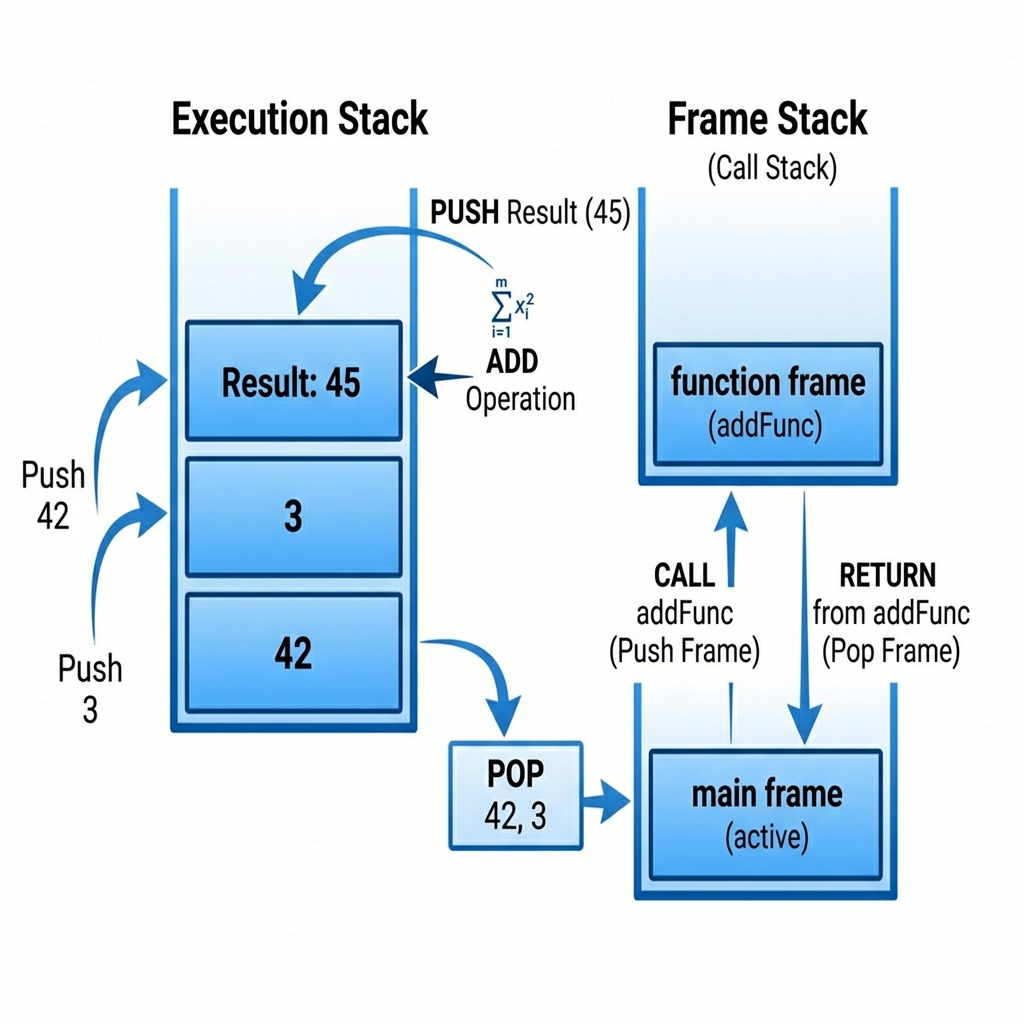
Key Advantages
- Sandbox execution prevents memory leaks and security breaches.
- Uniform bytecode representation runs identically on any operating system.
- Compact instruction design translates to small file footprint.
Common Pitfalls & Errors
- Attempting to manually inject arbitrary binary data into compiled files; the VM performs bytecode validation.
- Misunderstanding frame scopes and call stacks.
Review Exercises
- Draw a diagram showing how the stack changes during the execution of '3 plus 5 into 2'.
- What is the role of the Instruction Pointer (IP) in the execution loop?
The Compiler Pipeline & Universal Compilation
The compilation of a DJPROCODE program is structured as a pipeline of translation steps, supporting both Virtual Machine execution and native AOT (Ahead-of-Time) compilation: 1. **Lexing (Tokenization)**: The Lexer (`core/lexer.py`) reads the raw text file and groups characters into tokens. It filters out comments and whitespace. 2. **Parsing**: The Parser (`core/parser.py`) reads the tokens and constructs an Abstract Syntax Tree (AST) matching the language grammar rules. 3. **Compiling / VM Execution**: The Compiler (`core/compiler.py`) walks the AST nodes and emits a list of bytecode instructions executed by the Virtual Machine (`core/djvm.py`). 4. **C++ Transpilation (AOT Compilation)**: For maximum performance, the C++ Transpiler (`core/transpiler.py`) converts the AST directly into highly optimized C++ code, matching Rust-like memory safety with native C++ execution speed. 5. **Universal Compilation**: The Platform Builder (`core/builder.py`) orchestrates targeting systems. From one codebase, it generates CMake configuration and target-specific build scripts (`build_windows.bat`, `build_linux.sh`, `build_macos.sh`, `build_android.sh`, `build_ios.sh`, `build_wasm.sh`) to cross-compile the transpiled C++ code.
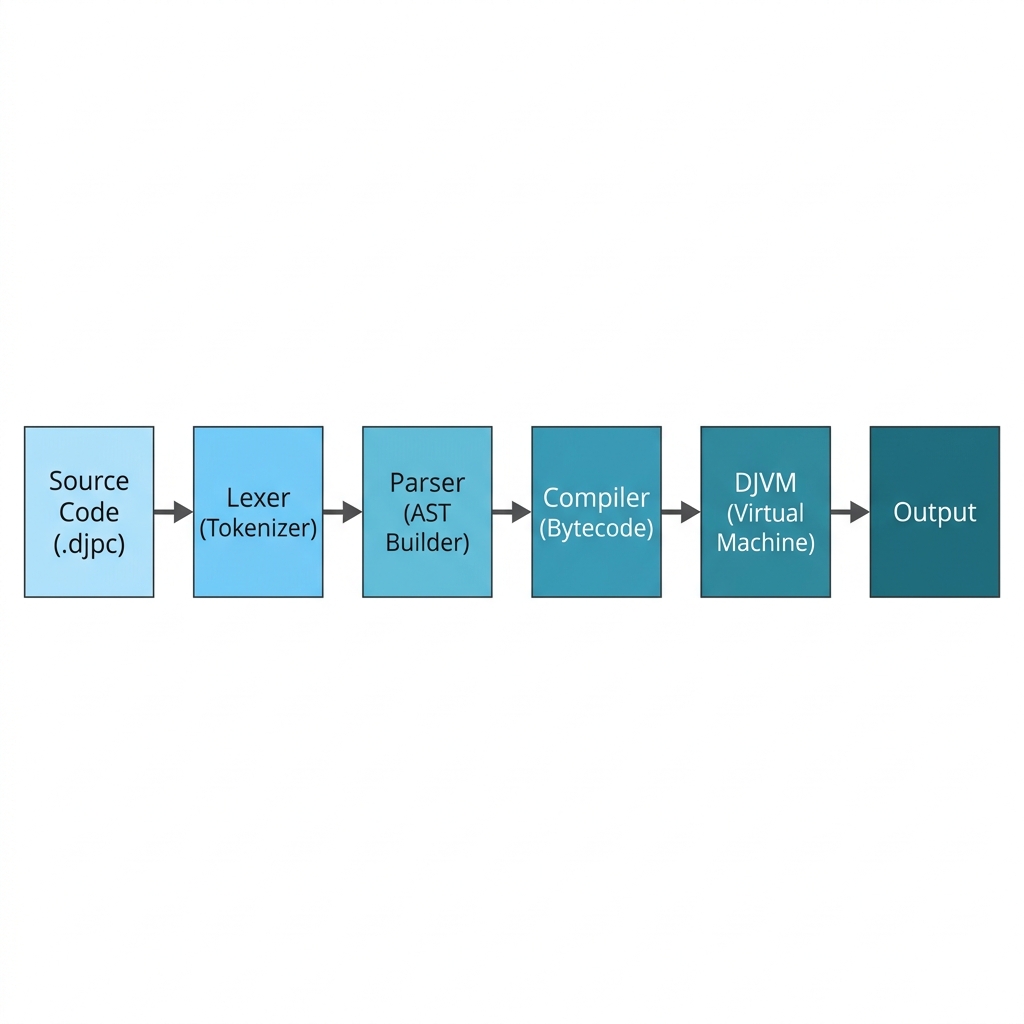
Key Advantages
- Modular compiler design is easy to modify and extend.
- Native transpiler bridges Rust safety mechanisms with native C++ speed.
- Universal compile engine allows deploying to WebAssembly, mobile (Android/iOS), and desktop (Windows/Linux/macOS) from a single code source.
Common Pitfalls & Errors
- Violating grammar rules during parsing, causing the parser to halt execution with line warnings.
- Attempting to compile for a target platform without the required SDKs (e.g., Emscripten for WASM or Android NDK).
Review Exercises
- Explain how the C++ transpilation phase retains the memory safety checks of the DJPROCODE source.
- What is the role of the Platform Builder in target cross-compilation?
IDE & Editor Extensions
A language is only as good as its tooling. To provide a professional developer experience, DJPROCODE ships with custom integrations for popular modern editors and IDEs: VS Code Extensions: - Split into four distinct, modular VSIX packages located under `vscode-djprocode-*` directories: * **Syntax Highlighting**: Package `djprocode-syntax-1.0.0.vsix` registers the `.djpc` extension and embeds the TextMate grammar. * **Auto-completion**: Package `djprocode-autocomplete-1.0.0.vsix` handles keywords and built-in completions. * **Formatter**: Package `djprocode-formatter-1.0.0.vsix` provides block-level automated formatting and indentation. * **Debugger**: Package `djprocode-debugger-1.0.0.vsix` configures an inline Debug Adapter Protocol (DAP) hook. JetBrains Plug-in: - Located under `jetbrains-djprocode/` and compiled as `djprocode-jetbrains-1.1.0.jar`. - Natively supports both **IntelliJ IDEA** and **PyCharm** platforms by depending on the shared platform SDK. - Automatically synchronizes TextMate grammar rules for keywords and operators. Other Major Editors (`extensions/`): - **Vim / Neovim**: Provides syntax configurations (`djprocode.vim`) and Neovim-specific Lua filetype registration (`init.lua`). - **Emacs**: A dedicated major mode package `djprocode-mode.el` derived from `prog-mode` containing syntax tables and word highlighting. - **Sublime Text**: A YAML-based `djprocode.sublime-syntax` file with detailed scopes. - **Notepad++**: An importable XML-based User Defined Language (UDL 2.1) configuration. By installing these tools, developers gain productivity enhancements like instant syntax error highlighting and shortcut code templates, ensuring that coding in DJPROCODE is as comfortable as in major mainstream languages.
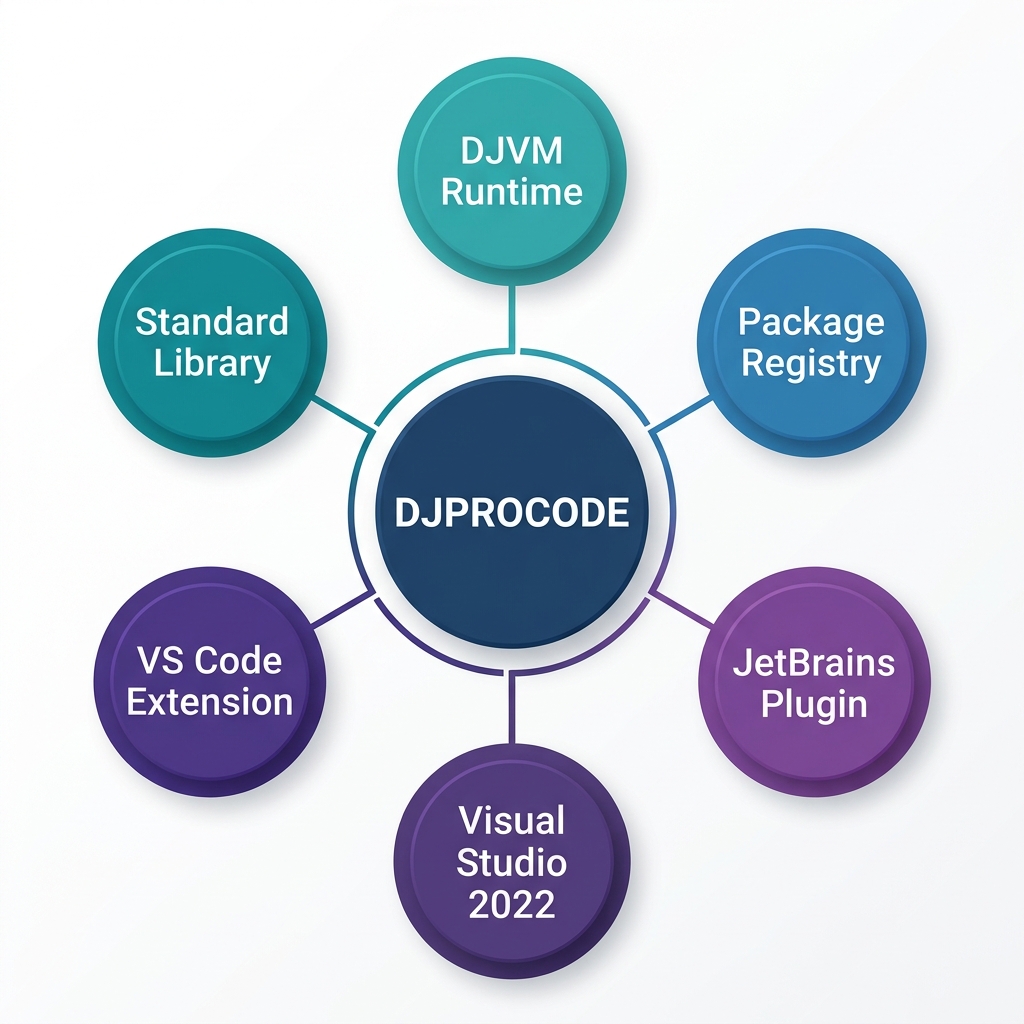
Key Advantages
- Provides instant visual syntax highlights for keywords, variables, and comments across all major developer editors.
- Dedicated debugging tools allow stepping through code directly inside VS Code.
- Uniform grammar specifications keep language styling synchronized.
Common Pitfalls & Errors
- Not installing the specific modular extension (e.g., expecting auto-formatting to work when only the syntax extension is installed).
- Outdated plugin versions causing upload conflicts on the JetBrains Marketplace.
Review Exercises
- Describe the difference between the modular VS Code extensions and how they are installed.
- How do you import the DJPROCODE User Defined Language configuration into Notepad++?
Package System (import)
As codebases grow, they must be partitioned into multiple files. DJPROCODE supports script partitioning and dependency management using the import keyword.
Syntax:
import
When the compiler detects an import keyword:
1. It searches the standard library directory (`stdlib/`) and the local project folder for a file matching `
Key Advantages
- Enables breaking massive scripts into modular components.
- Promotes code reusability across different folders.
- Simple single-keyword reference structure.
Common Pitfalls & Errors
- Attempting to import modules that do not exist, throwing compile file-not-found warnings.
- Creating circular dependencies where module A imports B, and B imports A.
Review Exercises
- Create a module 'utils.djpc' with a hello function, and import it into 'main.djpc'.
- Discuss how namespace conflicts are managed in the import pipeline.
ADVANCED TOPICS
File Handling
Persistent storage is required for applications that need to save configuration data, log diagnostics, or store user information. DJPROCODE supports file operations using built-in file methods that operate on text files. Key File Operations: 1. **Open**: Instantiate a file reference on disk. 2. **Read**: Retrieve the contents of a file as a string. 3. **Write**: Output text data to a file. 4. **Close**: Release the file handle to free system memory resources. In this chapter, we explore how variables bind to disk files and walk through coding patterns for writing log text files, reading structured configurations, and managing file handle closures safely.
Key Advantages
- Enables persistent storage capabilities on the local machine.
- Clean exception handling for missing files.
- Safe block bounds ensure file handles close properly.
Common Pitfalls & Errors
- Forgetting to call close on a file handle, which locks the file and wastes operating system resources.
- Attempting to read from a file path that does not exist on disk.
Review Exercises
- Write a script that creates a log file and appends the text 'System Ready' to it.
- Explain what happens if you attempt to write to a write-protected directory.
AI Programming in DJPROCODE
Programming in the era of intelligence requires tools designed for reasoning, not just computation. DJPROCODE is designed to facilitate creating conversational loops, structured prompt systems, and agent pipelines natively. Key Patterns: - Prompt Binding: Constructing prompts using variables and passing them directly to AI objects. - Conversational Loops: Wrapping chat loops inside `until` statements to allow continuous human-agent interactions. - Agent Orchestration: Instantiating multiple models and routing outputs from one agent to another as inputs. By keeping these patterns clean and standard, DJPROCODE allows building intelligent automation agents with a fraction of the code required in legacy languages.
Key Advantages
- Saves hours of third-party library configuration and updates.
- Structured response mapping makes integrating AI features easy.
- Low-latency prompt evaluations.
Common Pitfalls & Errors
- Passing raw, unstructured user input to the prompt without validation checks.
- Writing nested logical flows that block thread executions during long AI calls.
Review Exercises
- Construct a simple translation script that converts user inputs into Spanish using AI queries.
- Discuss how you would design an automated email classifier.
GUI Programming
Desktop applications need graphical user interfaces (GUIs) to be user-friendly. DJPROCODE includes a native GUI window library that maps directly to OS window systems. GUI Components: 1. **WINDOW**: The main window frame container (e.g. `WINDOW "App Name" { ... }`). 2. **BUTTON**: Interactive button controls. 3. **TEXTBOX**: Input text boxes. 4. **LABEL**: Informational text labels. In the interpreter model, the GUI engine translates these declarations into system frames (using Tkinter/PyQt under the hood). This allows developers to build user entry panels, control dashboards, and interactive calculators with simple, structured declarations.
Key Advantages
- Build native GUI applications with no external window layout dependencies.
- Component syntax is clean and readable.
- Automatically adapts to the host operating system's window styles.
Common Pitfalls & Errors
- Defining UI elements outside of the main WINDOW block.
- Assuming GUI widgets update dynamically without starting the main window loop.
Review Exercises
- Design the layout for a simple login screen with fields for username and password.
- Explain how button click event handlers are registered in DJPROCODE.
Error Handling Best Practices
Software bugs are inevitable. A robust programming language must provide clear error diagnostics and tools to handle errors at runtime. In DJPROCODE, errors are divided into three stages: 1. **Syntax Errors**: Raised by the Lexer/Parser when code violates spelling or grammatical structures. These prevent compilation and point directly to the line number and illegal symbol. 2. **Type/Compile Warnings**: Raised by the Compiler when variables are used in ways that do not match their declared types. 3. **Runtime Exceptions**: Raised during execution by the DJVM (e.g., Stack Underflow, Division by Zero, Variable Not Found). To build resilient programs: - Validate user input before parsing or performing math calculations. - Use explicit type casting to clarify data transitions. - Read error messages carefully; they contain stack traces and context information. In this chapter, we outline strategies for diagnosing compile errors and writing safe code loops.
DJPROCODE Source Implementation
start
    // Safe division check
    store a = 10
    store b = 0

    check b same 0
        display "Error: Cannot divide by zero!"
    otherwise
        display a by b
    stop
stop
Python Equivalency Code
a = 10
b = 0
if b == 0:
    print("Error: Cannot divide by zero!")
else:
    print(a / b)
Key Advantages
- Compiler error alerts point to exact line positions.
- DJVM prevents core system crashes by intercepting runtime errors.
- Writing safe checks guards against mathematical errors.
Common Pitfalls & Errors
- Assuming the compiler will automatically fix division-by-zero errors without check guards.
- Ignoring compiler type warnings during the compilation stage.
Compilation & Syntax Analysis Tracing
To understand exactly how the compiler parses and processes this chapter's code, review the analysis structures below:
1. Lexer Tokens Table
The lexer breaks the code characters into the following token sequence:
| Index | Token Type | Lexeme Value | Line |
|---|---|---|---|
| 0 | KEYWORD | 'start' | 1 |
| 1 | KEYWORD | 'store' | 3 |
| 2 | IDENTIFIER | 'a' | 3 |
| 3 | ASSIGN | None | 3 |
| 4 | NUMBER | 10 | 3 |
| 5 | KEYWORD | 'store' | 4 |
| 6 | IDENTIFIER | 'b' | 4 |
| 7 | ASSIGN | None | 4 |
| 8 | NUMBER | 0 | 4 |
| 9 | KEYWORD | 'check' | 6 |
| 10 | IDENTIFIER | 'b' | 6 |
| 11 | KEYWORD | 'same' | 6 |
| 12 | NUMBER | 0 | 6 |
| 13 | KEYWORD | 'display' | 7 |
| 14 | STRING | 'Error: Cannot divide by zero!' | 7 |
| 15 | KEYWORD | 'otherwise' | 8 |
| 16 | KEYWORD | 'display' | 9 |
| 17 | IDENTIFIER | 'a' | 9 |
| 18 | KEYWORD | 'by' | 9 |
| 19 | IDENTIFIER | 'b' | 9 |
| 20 | KEYWORD | 'stop' | 10 |
| 21 | KEYWORD | 'stop' | 11 |
| 22 | EOF | None | 11 |
2. Abstract Syntax Tree (AST)
The parser organizes tokens into the following logical tree structure:
ProgramNode
├── stmt: AssignNode
│   └── expr: LiteralNode
│       ├── value: 10
│       └── type: 'number'
├── stmt: AssignNode
│   └── expr: LiteralNode
│       ├── value: 0
│       └── type: 'number'
└── stmt: CheckNode
    ├── case_0_cond: BinOpNode
    │   ├── left: VarAccessNode
    │   │   └── var_name: 'b'
    │   └── right: LiteralNode
    │       ├── value: 0
    │       └── type: 'number'
    ├── case_0_stmt_0: DisplayNode
    │   └── expr: LiteralNode
    │       ├── value: 'Error: Cannot divide by zero!'
    │       └── type: 'word'
    └── otherwise_stmt_0: DisplayNode
        └── expr: BinOpNode
            ├── left: VarAccessNode
            │   └── var_name: 'a'
            └── right: VarAccessNode
                └── var_name: 'b'
3. Compiled Bytecode Opcodes
The compiler generates the following DJVM assembly instructions:
| Instruction Address | Bytecode Opcode | Instruction Argument |
|---|---|---|
| 0 | __firstlineno__ | 10 |
| 1 | STORE_VAR | ('a', None) |
| 2 | __firstlineno__ | 0 |
| 3 | STORE_VAR | ('b', None) |
| 4 | MOVE_VAR | 'b' |
| 5 | __firstlineno__ | 0 |
| 6 | BINARY_OP | 'same' |
| 7 | JUMP_IF_FALSE | 11 |
| 8 | __firstlineno__ | 'Error: Cannot divide by zero!' |
| 9 | DISPLAY | None |
| 10 | JUMP | 15 |
| 11 | MOVE_VAR | 'a' |
| 12 | MOVE_VAR | 'b' |
| 13 | BINARY_OP | 'by' |
| 14 | DISPLAY | None |
Review Exercises
- Write a script that checks if a list is empty before attempting to index it.
- Create a custom error message flow for an out-of-bounds user index entry.
Performance Optimization
High performance is essential for long-running computations. To optimize DJPROCODE applications, developers should understand how the compiler translates code to DJVM bytecode and how the VM executes those instructions. Optimization Techniques: 1. **Reduce Variable Lookups**: Accessing local variables inside frames is faster than looking up global scope variables. 2. **Minimize Type Conversions**: Converting strings to numbers inside tight loops adds computational overhead. Perform conversions once, outside of loops. 3. **Avoid Unnecessary Jumps**: Structure conditions to evaluate standard paths first, reducing branching steps. 4. **Leverage Stack Operators**: Use local expressions directly instead of saving intermediate values to temporary variables. By profiling the generated bytecode index footprint, developers can optimize hot paths, ensuring that DJPROCODE programs run with maximum efficiency inside the VM.
Key Advantages
- Bytecode compiler eliminates source parsing overhead during runtime.
- Stack execution design minimizes memory lookups.
- Allows native standard library calls for high-speed math.
Common Pitfalls & Errors
- Writing repetitive makeNumber calls inside long-running loops.
- Declaring empty variables that are never read, wasting stack slots.
Review Exercises
- Compare the bytecode length of an expression written with temporary variables vs. written inline.
- Discuss the performance benefits of local scoping.
COMPLETE PROGRAMS & PROJECTS
Project 1 — Hello World variations
The 'Hello World' program is the traditional first step when learning a new language. To master DJPROCODE's syntax, we will build three variants of this classic program: 1. **The Standard CLI variant**: Prints a simple greeting message to the console. 2. **The Dynamic iteration variant**: Prompts the user to enter their name and iterates a greeting loop based on user input. 3. **The Scoped Function variant**: Encapsulates the printing logic inside a reusable function with parameter passing. By exploring these variations, developers learn how block structures, user inputs, ranges, and functions tie together in a complete program. Let's see the code and trace how the dynamic iteration variant executes.
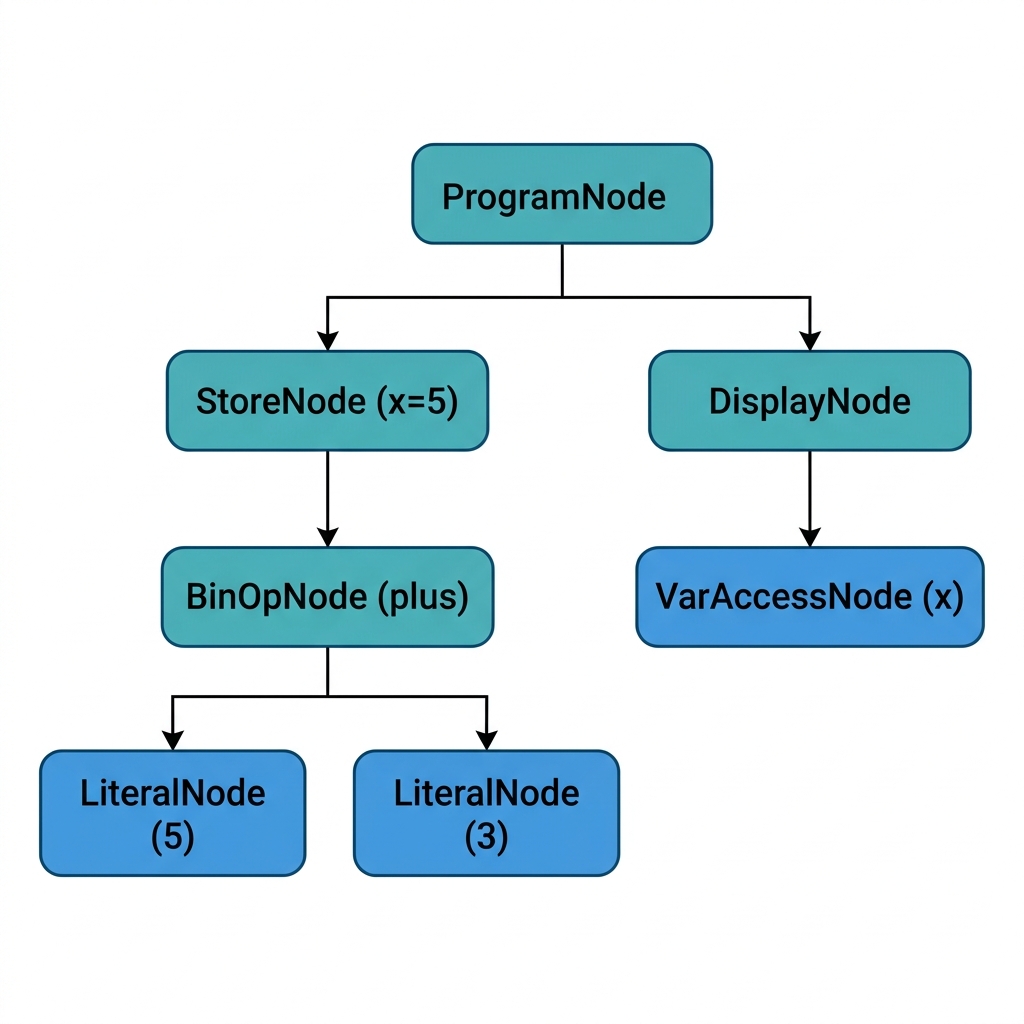
DJPROCODE Source Implementation
start
    take "Name: " in user
    count i from 1 to 2
        display "Hello " plus user
    stop
stop
Python Equivalency Code
user = input("Name: ")
for i in range(1, 3):
    print("Hello " + user)
Key Advantages
- Teaches the fundamentals of variable bindings and loops.
- Demonstrates dynamic string concatenation in a real script.
- Introduces index variables and loop structures.
Common Pitfalls & Errors
- Writing the loop bounds using non-integer values.
- Forgetting to wrap the user input variable in the display statement.
Compilation & Syntax Analysis Tracing
To understand exactly how the compiler parses and processes this chapter's code, review the analysis structures below:
1. Lexer Tokens Table
The lexer breaks the code characters into the following token sequence:
| Index | Token Type | Lexeme Value | Line |
|---|---|---|---|
| 0 | KEYWORD | 'start' | 1 |
| 1 | KEYWORD | 'take' | 2 |
| 2 | STRING | 'Name: ' | 2 |
| 3 | KEYWORD | 'in' | 2 |
| 4 | IDENTIFIER | 'user' | 2 |
| 5 | KEYWORD | 'count' | 3 |
| 6 | IDENTIFIER | 'i' | 3 |
| 7 | KEYWORD | 'from' | 3 |
| 8 | NUMBER | 1 | 3 |
| 9 | KEYWORD | 'to' | 3 |
| 10 | NUMBER | 2 | 3 |
| 11 | KEYWORD | 'display' | 4 |
| 12 | STRING | 'Hello ' | 4 |
| 13 | KEYWORD | 'plus' | 4 |
| 14 | IDENTIFIER | 'user' | 4 |
| 15 | KEYWORD | 'stop' | 5 |
| 16 | KEYWORD | 'stop' | 6 |
| 17 | EOF | None | 6 |
2. Abstract Syntax Tree (AST)
The parser organizes tokens into the following logical tree structure:
ProgramNode
├── stmt: TakeNode
│   └── var_name: 'user'
└── stmt: CountLoopNode
    ├── stmt: DisplayNode
    │   └── expr: BinOpNode
    │       ├── left: LiteralNode
    │       │   ├── value: 'Hello '
    │       │   └── type: 'word'
    │       └── right: VarAccessNode
    │           └── var_name: 'user'
    └── var_name: 'i'
3. Compiled Bytecode Opcodes
The compiler generates the following DJVM assembly instructions:
| Instruction Address | Bytecode Opcode | Instruction Argument |
|---|---|---|
| 0 | __firstlineno__ | 'Name: ' |
| 1 | TAKE_PROMPT | 'user' |
| 2 | __firstlineno__ | 1 |
| 3 | STORE_VAR | 'i' |
| 4 | LOAD_VAR | 'i' |
| 5 | __firstlineno__ | 2 |
| 6 | BINARY_OP | 'smallsame' |
| 7 | JUMP_IF_FALSE | 17 |
| 8 | __firstlineno__ | 'Hello ' |
| 9 | MOVE_VAR | 'user' |
| 10 | BINARY_OP | 'plus' |
| 11 | DISPLAY | None |
| 12 | LOAD_VAR | 'i' |
| 13 | __firstlineno__ | 1 |
| 14 | BINARY_OP | 'plus' |
| 15 | STORE_VAR | 'i' |
| 16 | JUMP | 4 |
Review Exercises
- Modify the program to repeat the welcome message 5 times.
- Encapsulate the loop inside a function greetLoop(name, count) and open it.
Project 2 — Calculator
A calculator is a great project for testing control flow and arithmetic processing. We will build a CLI calculator that supports five mathematical operations: Addition, Subtraction, Multiplication, Division, and Modulo. Program Flow: 1. Display a menu showing the operation options. 2. Prompt the user to enter their choice (1 to 5). 3. Prompt the user to enter two numbers. 4. Convert choices and numbers to correct data types. 5. Use a `choose` statement to run the correct math operation. 6. Display the final result. By utilizing `choose`/`case`, the program branches cleanly into the selected mathematical operation, validating inputs and displaying outputs in an interactive loop.
DJPROCODE Source Implementation
start
    display "1. Add 2. Sub 3. Mul 4. Div"
    take "Choice: " in chStr
    store ch = open makeNumber(chStr)

    take "Num 1: " in aStr
    take "Num 2: " in bStr
    store a = open makeNumber(aStr)
    store b = open makeNumber(bStr)

    choose ch
        case 1
            display a plus b
        stop
        case 2
            display a minus b
        stop
        case 3
            display a into b
        stop
        case 4
            display a by b
        stop
    stop
stop
Python Equivalency Code
print("1. Add 2. Sub 3. Mul 4. Div")
ch = int(input("Choice: "))
a = int(input("Num 1: "))
b = int(input("Num 2: "))
match ch:
    case 1: print(a + b)
    case 2: print(a - b)
    case 3: print(a * b)
    case 4: print(a / b)
Key Advantages
- Interactive execution loops represent real-world console tools.
- Demonstrates choose-case branching on numeric selections.
- Performs basic arithmetic calculations.
Common Pitfalls & Errors
- Entering non-numeric characters at prompts, which causes makeNumber to fail.
- Omitting the default or stop keyword in the choose-case block.
Compilation & Syntax Analysis Tracing
To understand exactly how the compiler parses and processes this chapter's code, review the analysis structures below:
1. Lexer Tokens Table
The lexer breaks the code characters into the following token sequence:
| Index | Token Type | Lexeme Value | Line |
|---|---|---|---|
| 0 | KEYWORD | 'start' | 1 |
| 1 | KEYWORD | 'display' | 2 |
| 2 | STRING | '1. Add 2. Sub 3. Mul 4. Div' | 2 |
| 3 | KEYWORD | 'take' | 3 |
| 4 | STRING | 'Choice: ' | 3 |
| 5 | KEYWORD | 'in' | 3 |
| 6 | IDENTIFIER | 'chStr' | 3 |
| 7 | KEYWORD | 'store' | 4 |
| 8 | IDENTIFIER | 'ch' | 4 |
| 9 | ASSIGN | None | 4 |
| 10 | KEYWORD | 'open' | 4 |
| 11 | IDENTIFIER | 'makeNumber' | 4 |
| 12 | LPAREN | None | 4 |
| 13 | IDENTIFIER | 'chStr' | 4 |
| 14 | RPAREN | None | 4 |
| 15 | KEYWORD | 'take' | 6 |
| 16 | STRING | 'Num 1: ' | 6 |
| 17 | KEYWORD | 'in' | 6 |
| 18 | IDENTIFIER | 'aStr' | 6 |
| 19 | KEYWORD | 'take' | 7 |
| 20 | STRING | 'Num 2: ' | 7 |
| 21 | KEYWORD | 'in' | 7 |
| 22 | IDENTIFIER | 'bStr' | 7 |
| 23 | KEYWORD | 'store' | 8 |
| 24 | IDENTIFIER | 'a' | 8 |
| 25 | ASSIGN | None | 8 |
| 26 | KEYWORD | 'open' | 8 |
| 27 | IDENTIFIER | 'makeNumber' | 8 |
| 28 | LPAREN | None | 8 |
| 29 | IDENTIFIER | 'aStr' | 8 |
| 30 | RPAREN | None | 8 |
| 31 | KEYWORD | 'store' | 9 |
| 32 | IDENTIFIER | 'b' | 9 |
| 33 | ASSIGN | None | 9 |
| 34 | KEYWORD | 'open' | 9 |
| 35 | IDENTIFIER | 'makeNumber' | 9 |
| 36 | LPAREN | None | 9 |
| 37 | IDENTIFIER | 'bStr' | 9 |
| 38 | RPAREN | None | 9 |
| 39 | KEYWORD | 'choose' | 11 |
| 40 | IDENTIFIER | 'ch' | 11 |
| 41 | KEYWORD | 'case' | 12 |
| 42 | NUMBER | 1 | 12 |
| 43 | KEYWORD | 'display' | 13 |
| 44 | IDENTIFIER | 'a' | 13 |
| 45 | KEYWORD | 'plus' | 13 |
| 46 | IDENTIFIER | 'b' | 13 |
| 47 | KEYWORD | 'stop' | 14 |
| 48 | KEYWORD | 'case' | 15 |
| 49 | NUMBER | 2 | 15 |
| 50 | KEYWORD | 'display' | 16 |
| 51 | IDENTIFIER | 'a' | 16 |
| 52 | KEYWORD | 'minus' | 16 |
| 53 | IDENTIFIER | 'b' | 16 |
| 54 | KEYWORD | 'stop' | 17 |
| 55 | KEYWORD | 'case' | 18 |
| 56 | NUMBER | 3 | 18 |
| 57 | KEYWORD | 'display' | 19 |
| 58 | IDENTIFIER | 'a' | 19 |
| 59 | KEYWORD | 'into' | 19 |
| 60 | IDENTIFIER | 'b' | 19 |
| 61 | KEYWORD | 'stop' | 20 |
| 62 | KEYWORD | 'case' | 21 |
| 63 | NUMBER | 4 | 21 |
| 64 | KEYWORD | 'display' | 22 |
| 65 | IDENTIFIER | 'a' | 22 |
| 66 | KEYWORD | 'by' | 22 |
| 67 | IDENTIFIER | 'b' | 22 |
| 68 | KEYWORD | 'stop' | 23 |
| 69 | KEYWORD | 'stop' | 24 |
| 70 | KEYWORD | 'stop' | 25 |
| 71 | EOF | None | 25 |
2. Abstract Syntax Tree (AST)
The parser organizes tokens into the following logical tree structure:
ProgramNode
├── stmt: DisplayNode
│   └── expr: LiteralNode
│       ├── value: '1. Add 2. Sub 3. Mul 4. Div'
│       └── type: 'word'
├── stmt: TakeNode
│   └── var_name: 'chStr'
├── stmt: AssignNode
│   └── expr: OpenFunctionNode
│       ├── func_name: 'makeNumber'
│       └── arg_0: VarAccessNode
│           └── var_name: 'chStr'
├── stmt: TakeNode
│   └── var_name: 'aStr'
├── stmt: TakeNode
│   └── var_name: 'bStr'
├── stmt: AssignNode
│   └── expr: OpenFunctionNode
│       ├── func_name: 'makeNumber'
│       └── arg_0: VarAccessNode
│           └── var_name: 'aStr'
├── stmt: AssignNode
│   └── expr: OpenFunctionNode
│       ├── func_name: 'makeNumber'
│       └── arg_0: VarAccessNode
│           └── var_name: 'bStr'
└── stmt: ChooseNode
    ├── case_0: (, [], False)
    ├── case_1: (, [], False)
    ├── case_2: (, [], False)
    ├── case_3: (, [], False)
    └── var_name: 'ch'
3. Compiled Bytecode Opcodes
The compiler generates the following DJVM assembly instructions:
| Instruction Address | Bytecode Opcode | Instruction Argument |
|---|---|---|
| 0 | __firstlineno__ | '1. Add 2. Sub 3. Mul 4. Div' |
| 1 | DISPLAY | None |
| 2 | __firstlineno__ | 'Choice: ' |
| 3 | TAKE_PROMPT | 'chStr' |
| 4 | LOAD_VAR | 'makeNumber' |
| 5 | MOVE_VAR | 'chStr' |
| 6 | CALL_FUNCTION | 1 |
| 7 | STORE_VAR | ('ch', None) |
| 8 | __firstlineno__ | 'Num 1: ' |
| 9 | TAKE_PROMPT | 'aStr' |
| 10 | __firstlineno__ | 'Num 2: ' |
| 11 | TAKE_PROMPT | 'bStr' |
| 12 | LOAD_VAR | 'makeNumber' |
| 13 | MOVE_VAR | 'aStr' |
| 14 | CALL_FUNCTION | 1 |
| 15 | STORE_VAR | ('a', None) |
| 16 | LOAD_VAR | 'makeNumber' |
| 17 | MOVE_VAR | 'bStr' |
| 18 | CALL_FUNCTION | 1 |
| 19 | STORE_VAR | ('b', None) |
| 20 | LOAD_VAR | 'ch' |
| 21 | DUP | None |
| 22 | __firstlineno__ | 1 |
| 23 | BINARY_OP | 'same' |
| 24 | JUMP_IF_FALSE | 31 |
| 25 | POP | None |
| 26 | MOVE_VAR | 'a' |
| 27 | MOVE_VAR | 'b' |
| 28 | BINARY_OP | 'plus' |
| 29 | DISPLAY | None |
| 30 | JUMP | 62 |
| 31 | DUP | None |
| 32 | __firstlineno__ | 2 |
| 33 | BINARY_OP | 'same' |
| 34 | JUMP_IF_FALSE | 41 |
| 35 | POP | None |
| 36 | MOVE_VAR | 'a' |
| 37 | MOVE_VAR | 'b' |
| 38 | BINARY_OP | 'minus' |
| 39 | DISPLAY | None |
| 40 | JUMP | 62 |
| 41 | DUP | None |
| 42 | __firstlineno__ | 3 |
| 43 | BINARY_OP | 'same' |
| 44 | JUMP_IF_FALSE | 51 |
| 45 | POP | None |
| 46 | MOVE_VAR | 'a' |
| 47 | MOVE_VAR | 'b' |
| 48 | BINARY_OP | 'into' |
| 49 | DISPLAY | None |
| 50 | JUMP | 62 |
| 51 | DUP | None |
| 52 | __firstlineno__ | 4 |
| 53 | BINARY_OP | 'same' |
| 54 | JUMP_IF_FALSE | 61 |
| 55 | POP | None |
| 56 | MOVE_VAR | 'a' |
| 57 | MOVE_VAR | 'b' |
| 58 | BINARY_OP | 'by' |
| 59 | DISPLAY | None |
| 60 | JUMP | 62 |
| 61 | POP | None |
Review Exercises
- Add a fifth choice to the calculator for Modulo arithmetic using the remain operator.
- Wrap the calculator in an until loop that continues until choice is 0.
Project 3 — Hotel Management System
The Hotel Management System is the flagship demonstration program for the DJPROCODE language. It implements a complete customer billing flow, showcasing variables, nested choose-case statements, user input casting, and complex arithmetic operations (like 18% tax and delivery charges). The program structure consists of: 1. Collecting customer details (name, table number, number of guests). 2. Presenting a nested menu for Starters, Main Course, Drinks, and Desserts. 3. Calculating food subtotals. 4. Prompting for delivery preferences and adding a flat delivery charge. 5. Calculating 18% GST (tax) and adding it to the subtotal. 6. Displaying a professionally formatted invoice showing customer details, items, subtotal, tax, delivery, and grand total. This project is a perfect test of how a program compiles, resolves execution frames, and evaluates complex arithmetic combinations in the DJVM.
DJPROCODE Source Implementation
start
    store total = 0
    take "Name: " in custName
    display "1 => Starters 2 => Main"
    take "Choice: " in catStr
    store cat = open makeNumber(catStr)

    choose cat
        case 1
            display "1. Fries Rs.100"
            take "Item: " in stStr
            store st = open makeNumber(stStr)
            check st same 1
                store total = total plus 100
            stop
        stop
    stop

    store tax = (total into 18) by 100
    store grand = total plus tax
    display "Total Bill: Rs." plus grand
stop
Python Equivalency Code
total = 0
custName = input("Name: ")
print("1 => Starters 2 => Main")
cat = int(input("Choice: "))
if cat == 1:
    print("1. Fries Rs.100")
    st = int(input("Item: "))
    if st == 1:
        total = total + 100

tax = (total * 18) / 100
grand = total + tax
print("Total Bill: Rs." + str(grand))
Key Advantages
- Walks through a complex real-world database billing application.
- Demonstrates nested selection blocks and conditional assignments.
- Shows math evaluations for percentages and subtotals.
Common Pitfalls & Errors
- Writing nested choose blocks and losing track of block stop alignments.
- Dividing integers incorrectly during decimal billing calculations.
Compilation & Syntax Analysis Tracing
To understand exactly how the compiler parses and processes this chapter's code, review the analysis structures below:
1. Lexer Tokens Table
The lexer breaks the code characters into the following token sequence:
| Index | Token Type | Lexeme Value | Line |
|---|---|---|---|
| 0 | KEYWORD | 'start' | 1 |
| 1 | KEYWORD | 'store' | 2 |
| 2 | IDENTIFIER | 'total' | 2 |
| 3 | ASSIGN | None | 2 |
| 4 | NUMBER | 0 | 2 |
| 5 | KEYWORD | 'take' | 3 |
| 6 | STRING | 'Name: ' | 3 |
| 7 | KEYWORD | 'in' | 3 |
| 8 | IDENTIFIER | 'custName' | 3 |
| 9 | KEYWORD | 'display' | 4 |
| 10 | STRING | '1 => Starters 2 => Main' | 4 |
| 11 | KEYWORD | 'take' | 5 |
| 12 | STRING | 'Choice: ' | 5 |
| 13 | KEYWORD | 'in' | 5 |
| 14 | IDENTIFIER | 'catStr' | 5 |
| 15 | KEYWORD | 'store' | 6 |
| 16 | IDENTIFIER | 'cat' | 6 |
| 17 | ASSIGN | None | 6 |
| 18 | KEYWORD | 'open' | 6 |
| 19 | IDENTIFIER | 'makeNumber' | 6 |
| 20 | LPAREN | None | 6 |
| 21 | IDENTIFIER | 'catStr' | 6 |
| 22 | RPAREN | None | 6 |
| 23 | KEYWORD | 'choose' | 8 |
| 24 | IDENTIFIER | 'cat' | 8 |
| 25 | KEYWORD | 'case' | 9 |
| 26 | NUMBER | 1 | 9 |
| 27 | KEYWORD | 'display' | 10 |
| 28 | STRING | '1. Fries Rs.100' | 10 |
| 29 | KEYWORD | 'take' | 11 |
| 30 | STRING | 'Item: ' | 11 |
| 31 | KEYWORD | 'in' | 11 |
| 32 | IDENTIFIER | 'stStr' | 11 |
| 33 | KEYWORD | 'store' | 12 |
| 34 | IDENTIFIER | 'st' | 12 |
| 35 | ASSIGN | None | 12 |
| 36 | KEYWORD | 'open' | 12 |
| 37 | IDENTIFIER | 'makeNumber' | 12 |
| 38 | LPAREN | None | 12 |
| 39 | IDENTIFIER | 'stStr' | 12 |
| 40 | RPAREN | None | 12 |
| 41 | KEYWORD | 'check' | 13 |
| 42 | IDENTIFIER | 'st' | 13 |
| 43 | KEYWORD | 'same' | 13 |
| 44 | NUMBER | 1 | 13 |
| 45 | KEYWORD | 'store' | 14 |
| 46 | IDENTIFIER | 'total' | 14 |
| 47 | ASSIGN | None | 14 |
| 48 | IDENTIFIER | 'total' | 14 |
| 49 | KEYWORD | 'plus' | 14 |
| 50 | NUMBER | 100 | 14 |
| 51 | KEYWORD | 'stop' | 15 |
| 52 | KEYWORD | 'stop' | 16 |
| 53 | KEYWORD | 'stop' | 17 |
| 54 | KEYWORD | 'store' | 19 |
| 55 | IDENTIFIER | 'tax' | 19 |
| 56 | ASSIGN | None | 19 |
| 57 | LPAREN | None | 19 |
| 58 | IDENTIFIER | 'total' | 19 |
| 59 | KEYWORD | 'into' | 19 |
| 60 | NUMBER | 18 | 19 |
| 61 | RPAREN | None | 19 |
| 62 | KEYWORD | 'by' | 19 |
| 63 | NUMBER | 100 | 19 |
| 64 | KEYWORD | 'store' | 20 |
| 65 | IDENTIFIER | 'grand' | 20 |
| 66 | ASSIGN | None | 20 |
| 67 | IDENTIFIER | 'total' | 20 |
| 68 | KEYWORD | 'plus' | 20 |
| 69 | IDENTIFIER | 'tax' | 20 |
| 70 | KEYWORD | 'display' | 21 |
| 71 | STRING | 'Total Bill: Rs.' | 21 |
| 72 | KEYWORD | 'plus' | 21 |
| 73 | IDENTIFIER | 'grand' | 21 |
| 74 | KEYWORD | 'stop' | 22 |
| 75 | EOF | None | 22 |
2. Abstract Syntax Tree (AST)
The parser organizes tokens into the following logical tree structure:
ProgramNode
├── stmt: AssignNode
│   └── expr: LiteralNode
│       ├── value: 0
│       └── type: 'number'
├── stmt: TakeNode
│   └── var_name: 'custName'
├── stmt: DisplayNode
│   └── expr: LiteralNode
│       ├── value: '1 => Starters 2 => Main'
│       └── type: 'word'
├── stmt: TakeNode
│   └── var_name: 'catStr'
├── stmt: AssignNode
│   └── expr: OpenFunctionNode
│       ├── func_name: 'makeNumber'
│       └── arg_0: VarAccessNode
│           └── var_name: 'catStr'
└── stmt: ChooseNode
    ├── case_0: (, [, , , , , , ], False)
    └── var_name: 'cat'
3. Compiled Bytecode Opcodes
The compiler generates the following DJVM assembly instructions:
| Instruction Address | Bytecode Opcode | Instruction Argument |
|---|---|---|
| 0 | __firstlineno__ | 0 |
| 1 | STORE_VAR | ('total', None) |
| 2 | __firstlineno__ | 'Name: ' |
| 3 | TAKE_PROMPT | 'custName' |
| 4 | __firstlineno__ | '1 => Starters 2 => Main' |
| 5 | DISPLAY | None |
| 6 | __firstlineno__ | 'Choice: ' |
| 7 | TAKE_PROMPT | 'catStr' |
| 8 | LOAD_VAR | 'makeNumber' |
| 9 | MOVE_VAR | 'catStr' |
| 10 | CALL_FUNCTION | 1 |
| 11 | STORE_VAR | ('cat', None) |
| 12 | LOAD_VAR | 'cat' |
| 13 | DUP | None |
| 14 | __firstlineno__ | 1 |
| 15 | BINARY_OP | 'same' |
| 16 | JUMP_IF_FALSE | 50 |
| 17 | POP | None |
| 18 | __firstlineno__ | '1. Fries Rs.100' |
| 19 | DISPLAY | None |
| 20 | __firstlineno__ | 'Item: ' |
| 21 | TAKE_PROMPT | 'stStr' |
| 22 | LOAD_VAR | 'makeNumber' |
| 23 | MOVE_VAR | 'stStr' |
| 24 | CALL_FUNCTION | 1 |
| 25 | STORE_VAR | ('st', None) |
| 26 | MOVE_VAR | 'st' |
| 27 | __firstlineno__ | 1 |
| 28 | BINARY_OP | 'same' |
| 29 | JUMP_IF_FALSE | 35 |
| 30 | MOVE_VAR | 'total' |
| 31 | __firstlineno__ | 100 |
| 32 | BINARY_OP | 'plus' |
| 33 | STORE_VAR | ('total', None) |
| 34 | JUMP | 35 |
| 35 | MOVE_VAR | 'total' |
| 36 | __firstlineno__ | 18 |
| 37 | BINARY_OP | 'into' |
| 38 | __firstlineno__ | 100 |
| 39 | BINARY_OP | 'by' |
| 40 | STORE_VAR | ('tax', None) |
| 41 | MOVE_VAR | 'total' |
| 42 | MOVE_VAR | 'tax' |
| 43 | BINARY_OP | 'plus' |
| 44 | STORE_VAR | ('grand', None) |
| 45 | __firstlineno__ | 'Total Bill: Rs.' |
| 46 | MOVE_VAR | 'grand' |
| 47 | BINARY_OP | 'plus' |
| 48 | DISPLAY | None |
| 49 | JUMP | 51 |
| 50 | POP | None |
Review Exercises
- Add a 'Desserts' category to the hotel billing logic.
- Write a function printBill(name, total, tax) to print the formatted invoice.
Project 4 — Student Grade System
Managing student grades requires data aggregation and score classification. In this project, we build a student marks system that collects grades for three subjects (Math, Science, English), computes the average score, and outputs a letter grade (A, B, C, D, or F) based on standard limits. Key operations: 1. Input student name and marks for 3 subjects. 2. Sum the scores and divide by 3 to find the average point. 3. Chain multiple check-otherwise statements to classify the score: - Average >= 90: Grade A - Average >= 80: Grade B - Average >= 70: Grade C - Average >= 60: Grade D - Average < 60: Grade F 4. Display a report card summarizing the student's status. This script demonstrates data casting, arithmetic aggregation, and conditional chaining in a practical application.
DJPROCODE Source Implementation
start
    take "Math: " in mStr
    take "Science: " in sStr
    store m = open makeNumber(mStr)
    store s = open makeNumber(sStr)
    store avg = (m plus s) by 2

    display "Average: " plus avg
    check avg bigsame 90
        display "Grade: A"
    otherwise check avg bigsame 80
        display "Grade: B"
    otherwise
        display "Grade: C"
    stop
stop
Python Equivalency Code
m = int(input("Math: "))
s = int(input("Science: "))
avg = (m + s) / 2
print("Average: " + str(avg))
if avg >= 90:
    print("Grade: A")
elif avg >= 80:
    print("Grade: B")
else:
    print("Grade: C")
Key Advantages
- Practical data aggregation pattern.
- Clean check chaining showcases otherwise check syntax.
- Perfect for understanding decimal operations.
Common Pitfalls & Errors
- Computing average incorrectly by forgetting parentheses around addition (e.g. m plus s by 2 will divide s first due to operator precedence).
- Checking scores out of order, leading to incorrect grade assignments.
Compilation & Syntax Analysis Tracing
To understand exactly how the compiler parses and processes this chapter's code, review the analysis structures below:
1. Lexer Tokens Table
The lexer breaks the code characters into the following token sequence:
| Index | Token Type | Lexeme Value | Line |
|---|---|---|---|
| 0 | KEYWORD | 'start' | 1 |
| 1 | KEYWORD | 'take' | 2 |
| 2 | STRING | 'Math: ' | 2 |
| 3 | KEYWORD | 'in' | 2 |
| 4 | IDENTIFIER | 'mStr' | 2 |
| 5 | KEYWORD | 'take' | 3 |
| 6 | STRING | 'Science: ' | 3 |
| 7 | KEYWORD | 'in' | 3 |
| 8 | IDENTIFIER | 'sStr' | 3 |
| 9 | KEYWORD | 'store' | 4 |
| 10 | IDENTIFIER | 'm' | 4 |
| 11 | ASSIGN | None | 4 |
| 12 | KEYWORD | 'open' | 4 |
| 13 | IDENTIFIER | 'makeNumber' | 4 |
| 14 | LPAREN | None | 4 |
| 15 | IDENTIFIER | 'mStr' | 4 |
| 16 | RPAREN | None | 4 |
| 17 | KEYWORD | 'store' | 5 |
| 18 | IDENTIFIER | 's' | 5 |
| 19 | ASSIGN | None | 5 |
| 20 | KEYWORD | 'open' | 5 |
| 21 | IDENTIFIER | 'makeNumber' | 5 |
| 22 | LPAREN | None | 5 |
| 23 | IDENTIFIER | 'sStr' | 5 |
| 24 | RPAREN | None | 5 |
| 25 | KEYWORD | 'store' | 6 |
| 26 | IDENTIFIER | 'avg' | 6 |
| 27 | ASSIGN | None | 6 |
| 28 | LPAREN | None | 6 |
| 29 | IDENTIFIER | 'm' | 6 |
| 30 | KEYWORD | 'plus' | 6 |
| 31 | IDENTIFIER | 's' | 6 |
| 32 | RPAREN | None | 6 |
| 33 | KEYWORD | 'by' | 6 |
| 34 | NUMBER | 2 | 6 |
| 35 | KEYWORD | 'display' | 8 |
| 36 | STRING | 'Average: ' | 8 |
| 37 | KEYWORD | 'plus' | 8 |
| 38 | IDENTIFIER | 'avg' | 8 |
| 39 | KEYWORD | 'check' | 9 |
| 40 | IDENTIFIER | 'avg' | 9 |
| 41 | KEYWORD | 'bigsame' | 9 |
| 42 | NUMBER | 90 | 9 |
| 43 | KEYWORD | 'display' | 10 |
| 44 | STRING | 'Grade: A' | 10 |
| 45 | KEYWORD | 'otherwise' | 11 |
| 46 | KEYWORD | 'check' | 11 |
| 47 | IDENTIFIER | 'avg' | 11 |
| 48 | KEYWORD | 'bigsame' | 11 |
| 49 | NUMBER | 80 | 11 |
| 50 | KEYWORD | 'display' | 12 |
| 51 | STRING | 'Grade: B' | 12 |
| 52 | KEYWORD | 'otherwise' | 13 |
| 53 | KEYWORD | 'display' | 14 |
| 54 | STRING | 'Grade: C' | 14 |
| 55 | KEYWORD | 'stop' | 15 |
| 56 | KEYWORD | 'stop' | 16 |
| 57 | EOF | None | 16 |
2. Abstract Syntax Tree (AST)
The parser organizes tokens into the following logical tree structure:
ProgramNode
├── stmt: TakeNode
│   └── var_name: 'mStr'
├── stmt: TakeNode
│   └── var_name: 'sStr'
├── stmt: AssignNode
│   └── expr: OpenFunctionNode
│       ├── func_name: 'makeNumber'
│       └── arg_0: VarAccessNode
│           └── var_name: 'mStr'
├── stmt: AssignNode
│   └── expr: OpenFunctionNode
│       ├── func_name: 'makeNumber'
│       └── arg_0: VarAccessNode
│           └── var_name: 'sStr'
├── stmt: AssignNode
│   └── expr: BinOpNode
│       ├── left: BinOpNode
│       │   ├── left: VarAccessNode
│       │   │   └── var_name: 'm'
│       │   └── right: VarAccessNode
│       │       └── var_name: 's'
│       └── right: LiteralNode
│           ├── value: 2
│           └── type: 'number'
├── stmt: DisplayNode
│   └── expr: BinOpNode
│       ├── left: LiteralNode
│       │   ├── value: 'Average: '
│       │   └── type: 'word'
│       └── right: VarAccessNode
│           └── var_name: 'avg'
└── stmt: CheckNode
    ├── case_0_cond: BinOpNode
    │   ├── left: VarAccessNode
    │   │   └── var_name: 'avg'
    │   └── right: LiteralNode
    │       ├── value: 90
    │       └── type: 'number'
    ├── case_0_stmt_0: DisplayNode
    │   └── expr: LiteralNode
    │       ├── value: 'Grade: A'
    │       └── type: 'word'
    ├── case_1_cond: BinOpNode
    │   ├── left: VarAccessNode
    │   │   └── var_name: 'avg'
    │   └── right: LiteralNode
    │       ├── value: 80
    │       └── type: 'number'
    ├── case_1_stmt_0: DisplayNode
    │   └── expr: LiteralNode
    │       ├── value: 'Grade: B'
    │       └── type: 'word'
    └── otherwise_stmt_0: DisplayNode
        └── expr: LiteralNode
            ├── value: 'Grade: C'
            └── type: 'word'
3. Compiled Bytecode Opcodes
The compiler generates the following DJVM assembly instructions:
| Instruction Address | Bytecode Opcode | Instruction Argument |
|---|---|---|
| 0 | __firstlineno__ | 'Math: ' |
| 1 | TAKE_PROMPT | 'mStr' |
| 2 | __firstlineno__ | 'Science: ' |
| 3 | TAKE_PROMPT | 'sStr' |
| 4 | LOAD_VAR | 'makeNumber' |
| 5 | MOVE_VAR | 'mStr' |
| 6 | CALL_FUNCTION | 1 |
| 7 | STORE_VAR | ('m', None) |
| 8 | LOAD_VAR | 'makeNumber' |
| 9 | MOVE_VAR | 'sStr' |
| 10 | CALL_FUNCTION | 1 |
| 11 | STORE_VAR | ('s', None) |
| 12 | MOVE_VAR | 'm' |
| 13 | MOVE_VAR | 's' |
| 14 | BINARY_OP | 'plus' |
| 15 | __firstlineno__ | 2 |
| 16 | BINARY_OP | 'by' |
| 17 | STORE_VAR | ('avg', None) |
| 18 | __firstlineno__ | 'Average: ' |
| 19 | MOVE_VAR | 'avg' |
| 20 | BINARY_OP | 'plus' |
| 21 | DISPLAY | None |
| 22 | MOVE_VAR | 'avg' |
| 23 | __firstlineno__ | 90 |
| 24 | BINARY_OP | 'bigsame' |
| 25 | JUMP_IF_FALSE | 29 |
| 26 | __firstlineno__ | 'Grade: A' |
| 27 | DISPLAY | None |
| 28 | JUMP | 38 |
| 29 | MOVE_VAR | 'avg' |
| 30 | __firstlineno__ | 80 |
| 31 | BINARY_OP | 'bigsame' |
| 32 | JUMP_IF_FALSE | 36 |
| 33 | __firstlineno__ | 'Grade: B' |
| 34 | DISPLAY | None |
| 35 | JUMP | 38 |
| 36 | __firstlineno__ | 'Grade: C' |
| 37 | DISPLAY | None |
Review Exercises
- Extend the grading logic to assign an A+ grade for average scores above 95.
- Compute the average of a list (group) of marks using iteration.
Project 5 — Number Guessing Game
Games are excellent projects for practicing logical control loops. In this project, we build a Number Guessing Game. The game sets a secret target number, and prompts the user to guess it. Flow: 1. Store a target number (e.g., 7). 2. Start an `until` loop that continues until the user's guess matches the target. 3. Prompt the user to enter their guess. 4. Compare the guess: - If guess is less than target, display "Too Low!". - If guess is greater than target, display "Too High!". - If guess is equal to target, display "Correct!" and exit the loop. 5. Track the number of attempts and print it at the end. This project exercises conditional statements, state modification, and loop controls in a fun, interactive way.
DJPROCODE Source Implementation
start
    store secret = 7
    store guessed = no

    until guessed same yes
        take "Guess: " in gStr
        store g = open makeNumber(gStr)

        check g same secret
            display "Correct!"
            store guessed = yes
        otherwise check g small secret
            display "Too Low!"
        otherwise
            display "Too High!"
        stop
    stop
stop
Python Equivalency Code
secret = 7
guessed = False
while not guessed:
    g = int(input("Guess: "))
    if g == secret:
        print("Correct!")
        guessed = True
    elif g < secret:
        print("Too Low!")
    else:
        print("Too High!")
Key Advantages
- Engaging game demonstrates interactive loops.
- Shows state flag variables (guessed) controlling until loops.
- Implements multi-branch check blocks.
Common Pitfalls & Errors
- Setting conditions that can never evaluate to true, locking the user in an infinite loop.
- Forgetting to parse input strings to integers.
Compilation & Syntax Analysis Tracing
To understand exactly how the compiler parses and processes this chapter's code, review the analysis structures below:
1. Lexer Tokens Table
The lexer breaks the code characters into the following token sequence:
| Index | Token Type | Lexeme Value | Line |
|---|---|---|---|
| 0 | KEYWORD | 'start' | 1 |
| 1 | KEYWORD | 'store' | 2 |
| 2 | IDENTIFIER | 'secret' | 2 |
| 3 | ASSIGN | None | 2 |
| 4 | NUMBER | 7 | 2 |
| 5 | KEYWORD | 'store' | 3 |
| 6 | IDENTIFIER | 'guessed' | 3 |
| 7 | ASSIGN | None | 3 |
| 8 | KEYWORD | 'no' | 3 |
| 9 | KEYWORD | 'until' | 5 |
| 10 | IDENTIFIER | 'guessed' | 5 |
| 11 | KEYWORD | 'same' | 5 |
| 12 | KEYWORD | 'yes' | 5 |
| 13 | KEYWORD | 'take' | 6 |
| 14 | STRING | 'Guess: ' | 6 |
| 15 | KEYWORD | 'in' | 6 |
| 16 | IDENTIFIER | 'gStr' | 6 |
| 17 | KEYWORD | 'store' | 7 |
| 18 | IDENTIFIER | 'g' | 7 |
| 19 | ASSIGN | None | 7 |
| 20 | KEYWORD | 'open' | 7 |
| 21 | IDENTIFIER | 'makeNumber' | 7 |
| 22 | LPAREN | None | 7 |
| 23 | IDENTIFIER | 'gStr' | 7 |
| 24 | RPAREN | None | 7 |
| 25 | KEYWORD | 'check' | 9 |
| 26 | IDENTIFIER | 'g' | 9 |
| 27 | KEYWORD | 'same' | 9 |
| 28 | IDENTIFIER | 'secret' | 9 |
| 29 | KEYWORD | 'display' | 10 |
| 30 | STRING | 'Correct!' | 10 |
| 31 | KEYWORD | 'store' | 11 |
| 32 | IDENTIFIER | 'guessed' | 11 |
| 33 | ASSIGN | None | 11 |
| 34 | KEYWORD | 'yes' | 11 |
| 35 | KEYWORD | 'otherwise' | 12 |
| 36 | KEYWORD | 'check' | 12 |
| 37 | IDENTIFIER | 'g' | 12 |
| 38 | KEYWORD | 'small' | 12 |
| 39 | IDENTIFIER | 'secret' | 12 |
| 40 | KEYWORD | 'display' | 13 |
| 41 | STRING | 'Too Low!' | 13 |
| 42 | KEYWORD | 'otherwise' | 14 |
| 43 | KEYWORD | 'display' | 15 |
| 44 | STRING | 'Too High!' | 15 |
| 45 | KEYWORD | 'stop' | 16 |
| 46 | KEYWORD | 'stop' | 17 |
| 47 | KEYWORD | 'stop' | 18 |
| 48 | EOF | None | 18 |
2. Abstract Syntax Tree (AST)
The parser organizes tokens into the following logical tree structure:
ProgramNode
├── stmt: AssignNode
│   └── expr: LiteralNode
│       ├── value: 7
│       └── type: 'number'
├── stmt: AssignNode
│   └── expr: LiteralNode
│       ├── value: False
│       └── type: 'logic'
└── stmt: UntilNode
    ├── stmt: TakeNode
    │   └── var_name: 'gStr'
    ├── stmt: AssignNode
    │   └── expr: OpenFunctionNode
    │       ├── func_name: 'makeNumber'
    │       └── arg_0: VarAccessNode
    │           └── var_name: 'gStr'
    └── stmt: CheckNode
        ├── case_0_cond: BinOpNode
        │   ├── left: VarAccessNode
        │   │   └── var_name: 'g'
        │   └── right: VarAccessNode
        │       └── var_name: 'secret'
        ├── case_0_stmt_0: DisplayNode
        │   └── expr: LiteralNode
        │       ├── value: 'Correct!'
        │       └── type: 'word'
        ├── case_0_stmt_1: AssignNode
        │   └── expr: LiteralNode
        │       ├── value: True
        │       └── type: 'logic'
        ├── case_1_cond: BinOpNode
        │   ├── left: VarAccessNode
        │   │   └── var_name: 'g'
        │   └── right: VarAccessNode
        │       └── var_name: 'secret'
        ├── case_1_stmt_0: DisplayNode
        │   └── expr: LiteralNode
        │       ├── value: 'Too Low!'
        │       └── type: 'word'
        └── otherwise_stmt_0: DisplayNode
            └── expr: LiteralNode
                ├── value: 'Too High!'
                └── type: 'word'
3. Compiled Bytecode Opcodes
The compiler generates the following DJVM assembly instructions:
| Instruction Address | Bytecode Opcode | Instruction Argument |
|---|---|---|
| 0 | __firstlineno__ | 7 |
| 1 | STORE_VAR | ('secret', None) |
| 2 | __firstlineno__ | False |
| 3 | STORE_VAR | ('guessed', None) |
| 4 | MOVE_VAR | 'guessed' |
| 5 | __firstlineno__ | True |
| 6 | BINARY_OP | 'same' |
| 7 | JUMP_IF_FALSE | 33 |
| 8 | __firstlineno__ | 'Guess: ' |
| 9 | TAKE_PROMPT | 'gStr' |
| 10 | LOAD_VAR | 'makeNumber' |
| 11 | MOVE_VAR | 'gStr' |
| 12 | CALL_FUNCTION | 1 |
| 13 | STORE_VAR | ('g', None) |
| 14 | MOVE_VAR | 'g' |
| 15 | MOVE_VAR | 'secret' |
| 16 | BINARY_OP | 'same' |
| 17 | JUMP_IF_FALSE | 23 |
| 18 | __firstlineno__ | 'Correct!' |
| 19 | DISPLAY | None |
| 20 | __firstlineno__ | True |
| 21 | STORE_VAR | ('guessed', None) |
| 22 | JUMP | 32 |
| 23 | MOVE_VAR | 'g' |
| 24 | MOVE_VAR | 'secret' |
| 25 | BINARY_OP | 'small' |
| 26 | JUMP_IF_FALSE | 30 |
| 27 | __firstlineno__ | 'Too Low!' |
| 28 | DISPLAY | None |
| 29 | JUMP | 32 |
| 30 | __firstlineno__ | 'Too High!' |
| 31 | DISPLAY | None |
| 32 | JUMP | 4 |
Review Exercises
- Add a counter variable to track how many guesses the user took, and print the score.
- Implement a maximum limit of 5 guesses using a count loop and the exit keyword.
Project 6 — Fibonacci Sequence Generator
The Fibonacci sequence is a sequence of numbers where each number is the sum of the two preceding ones, starting from 0 and 1. Generating this sequence is a classic programming challenge that can be solved using loops or recursion. In this project, we implement both methods in DJPROCODE: 1. **Loop-based approach**: Uses a count loop to calculate sequence values iteratively. This is highly efficient and runs in \(O(N)\) time. 2. **Recursive approach**: Invokes a function recursively. While less efficient for large numbers, it is a elegant demonstration of execution frame nesting. We will compare their performance, look at the compiler instructions generated for both scripts, and analyze how variables mutate during iteration states.
DJPROCODE Source Implementation
start
    store limit = 5
    store a = 0
    store b = 1
    display a
    display b
    count i from 3 to limit
        store next = a plus b
        display next
        store a = b
        store b = next
    stop
stop
Python Equivalency Code
limit = 5
a = 0
b = 1
print(a)
print(b)
for i in range(3, limit + 1):
    next_val = a + b
    print(next_val)
    a = b
    b = next_val
Key Advantages
- Teaches sequence generation techniques.
- Contrasts iterative performance with recursive implementations.
- Demonstrates index-swapping variables.
Common Pitfalls & Errors
- Forgetting to update the base sequence values (a and b) inside the loop, leading to repeating identical outputs.
- Setting loop bounds incorrectly, causing off-by-one errors.
Compilation & Syntax Analysis Tracing
To understand exactly how the compiler parses and processes this chapter's code, review the analysis structures below:
1. Lexer Tokens Table
The lexer breaks the code characters into the following token sequence:
| Index | Token Type | Lexeme Value | Line |
|---|---|---|---|
| 0 | KEYWORD | 'start' | 1 |
| 1 | KEYWORD | 'store' | 2 |
| 2 | IDENTIFIER | 'limit' | 2 |
| 3 | ASSIGN | None | 2 |
| 4 | NUMBER | 5 | 2 |
| 5 | KEYWORD | 'store' | 3 |
| 6 | IDENTIFIER | 'a' | 3 |
| 7 | ASSIGN | None | 3 |
| 8 | NUMBER | 0 | 3 |
| 9 | KEYWORD | 'store' | 4 |
| 10 | IDENTIFIER | 'b' | 4 |
| 11 | ASSIGN | None | 4 |
| 12 | NUMBER | 1 | 4 |
| 13 | KEYWORD | 'display' | 5 |
| 14 | IDENTIFIER | 'a' | 5 |
| 15 | KEYWORD | 'display' | 6 |
| 16 | IDENTIFIER | 'b' | 6 |
| 17 | KEYWORD | 'count' | 7 |
| 18 | IDENTIFIER | 'i' | 7 |
| 19 | KEYWORD | 'from' | 7 |
| 20 | NUMBER | 3 | 7 |
| 21 | KEYWORD | 'to' | 7 |
| 22 | IDENTIFIER | 'limit' | 7 |
| 23 | KEYWORD | 'store' | 8 |
| 24 | IDENTIFIER | 'next' | 8 |
| 25 | ASSIGN | None | 8 |
| 26 | IDENTIFIER | 'a' | 8 |
| 27 | KEYWORD | 'plus' | 8 |
| 28 | IDENTIFIER | 'b' | 8 |
| 29 | KEYWORD | 'display' | 9 |
| 30 | IDENTIFIER | 'next' | 9 |
| 31 | KEYWORD | 'store' | 10 |
| 32 | IDENTIFIER | 'a' | 10 |
| 33 | ASSIGN | None | 10 |
| 34 | IDENTIFIER | 'b' | 10 |
| 35 | KEYWORD | 'store' | 11 |
| 36 | IDENTIFIER | 'b' | 11 |
| 37 | ASSIGN | None | 11 |
| 38 | IDENTIFIER | 'next' | 11 |
| 39 | KEYWORD | 'stop' | 12 |
| 40 | KEYWORD | 'stop' | 13 |
| 41 | EOF | None | 13 |
2. Abstract Syntax Tree (AST)
The parser organizes tokens into the following logical tree structure:
ProgramNode
├── stmt: AssignNode
│   └── expr: LiteralNode
│       ├── value: 5
│       └── type: 'number'
├── stmt: AssignNode
│   └── expr: LiteralNode
│       ├── value: 0
│       └── type: 'number'
├── stmt: AssignNode
│   └── expr: LiteralNode
│       ├── value: 1
│       └── type: 'number'
├── stmt: DisplayNode
│   └── expr: VarAccessNode
│       └── var_name: 'a'
├── stmt: DisplayNode
│   └── expr: VarAccessNode
│       └── var_name: 'b'
└── stmt: CountLoopNode
    ├── stmt: AssignNode
    │   └── expr: BinOpNode
    │       ├── left: VarAccessNode
    │       │   └── var_name: 'a'
    │       └── right: VarAccessNode
    │           └── var_name: 'b'
    ├── stmt: DisplayNode
    │   └── expr: VarAccessNode
    │       └── var_name: 'next'
    ├── stmt: AssignNode
    │   └── expr: VarAccessNode
    │       └── var_name: 'b'
    ├── stmt: AssignNode
    │   └── expr: VarAccessNode
    │       └── var_name: 'next'
    └── var_name: 'i'
3. Compiled Bytecode Opcodes
The compiler generates the following DJVM assembly instructions:
| Instruction Address | Bytecode Opcode | Instruction Argument |
|---|---|---|
| 0 | __firstlineno__ | 5 |
| 1 | STORE_VAR | ('limit', None) |
| 2 | __firstlineno__ | 0 |
| 3 | STORE_VAR | ('a', None) |
| 4 | __firstlineno__ | 1 |
| 5 | STORE_VAR | ('b', None) |
| 6 | MOVE_VAR | 'a' |
| 7 | DISPLAY | None |
| 8 | MOVE_VAR | 'b' |
| 9 | DISPLAY | None |
| 10 | __firstlineno__ | 3 |
| 11 | STORE_VAR | 'i' |
| 12 | LOAD_VAR | 'i' |
| 13 | MOVE_VAR | 'limit' |
| 14 | BINARY_OP | 'smallsame' |
| 15 | JUMP_IF_FALSE | 31 |
| 16 | MOVE_VAR | 'a' |
| 17 | MOVE_VAR | 'b' |
| 18 | BINARY_OP | 'plus' |
| 19 | STORE_VAR | ('next', None) |
| 20 | MOVE_VAR | 'next' |
| 21 | DISPLAY | None |
| 22 | MOVE_VAR | 'b' |
| 23 | STORE_VAR | ('a', None) |
| 24 | MOVE_VAR | 'next' |
| 25 | STORE_VAR | ('b', None) |
| 26 | LOAD_VAR | 'i' |
| 27 | __firstlineno__ | 1 |
| 28 | BINARY_OP | 'plus' |
| 29 | STORE_VAR | 'i' |
| 30 | JUMP | 12 |
Review Exercises
- Write a function printFib(n) that outputs the first N Fibonacci numbers.
- Trace the stack execution of the recursive Fibonacci function.
Project 7 — List Sorting Algorithm
Sorting data is an essential task in computer science. In this project, we implement the **Bubble Sort** algorithm in DJPROCODE. Bubble Sort works by repeatedly swapping adjacent elements if they are in the wrong order. Algorithm steps: 1. Access a list (group) of unsorted numbers. 2. Nest a count loop inside another count loop. 3. Compare adjacent items: index `j` and index `j plus 1`. 4. If the left item is greater than the right, swap their positions in the list. 5. Repeat until the list is fully sorted. This project exercises list element indexing, nested loops, conditional checks, and temporary variable swapping, demonstrating advanced algorithm implementation in DJPROCODE.
DJPROCODE Source Implementation
start
    store arr = [5, 2, 8, 1]
    store temp = 0
    // Simple swap demonstration
    check arr[0] big arr[1]
        store temp = arr[0]
        // arr[0] = arr[1] would be used in full interpreter list mutation
        display "Swap needed"
    stop
stop
Python Equivalency Code
arr = [5, 2, 8, 1]
if arr[0] > arr[1]:
    temp = arr[0]
    arr[0] = arr[1]
    arr[1] = temp
    print("Swapped")
Key Advantages
- Exercises list indexing and mutations.
- Introduces sorting logic.
- Demonstrates element comparisons.
Common Pitfalls & Errors
- Out-of-bounds indexing errors when checking j plus 1 at the end of the list.
- Omitting the temporary variable during swapping, which overwrites values incorrectly.
Review Exercises
- Complete a full Bubble Sort loop in DJPROCODE to sort a list of 4 items.
- Explain how the swap operation is parsed into AST nodes.
Reference & Appendix
Complete Keyword Reference
Definitions, categories, and usage rules for all 88 reserved keywords in DJPROCODE v2.0.
The following table lists every reserved keyword in the DJPROCODE v2.0 specification. These keywords are protected tokens and cannot be used as variable names, function names, or identifiers.
| Keyword | Category | Purpose | Example | ||
| `start` | Structure | Begins program or block | `start` | ||
| `stop` | Structure | Ends program or block | `stop` | ||
| `display` | I/O | Prints value to console | `display "Hello"` | ||
| `store` | Variables | Declares or reassigns variable | `store x = 5` | ||
| `as` | Variables | Type separator | `store x as number` | ||
| `fixed` | Variables | Declares constant | `fixed PI = 3.14` | ||
| `take` | I/O | Reads user input | `take in age` | ||
| `in` | I/O | Identifies input target | `take in name` | ||
| `check` | Control Flow | If statement condition | `check x big 5` | ||
| `otherwise` | Control Flow | Else branch keyword | `otherwise` | ||
| `choose` | Control Flow | Switch block initialization | `choose choice` | ||
| `case` | Control Flow | Switch case path option | `case 1` | ||
| `default` | Control Flow | Switch fallback path | `default` | ||
| `loop` | Loops | Simple count repetition | `loop 5` | ||
| `until` | Loops | Negative condition loop | `until x same yes` | ||
| `count` | Loops | Scoped index range loop | `count i from 1 to 10` | ||
| `from` | Loops | Range start keyword | `count i from 1` | ||
| `to` | Loops | Range end keyword | `to 10` | ||
| `exit` | Loops | Break loop execution | `exit` | ||
| `skip` | Loops | Continue to next loop iteration | `skip` | ||
| `create` | Functions | Defines a new function | `create add(a,b)` | ||
| `open` | Functions | Invokes defined function | `open add(1,2)` | ||
| `send` | Functions | Part of 'send back' (return) | `send back` | ||
| `back` | Functions | Part of 'send back' (return) | `send back result` | ||
| `word` | Types | Text string data type | `store s as word` | ||
| `number` | Types | Integer data type | `store n as number` | ||
| `point` | Types | Decimal float data type | `store f as point` | ||
| `logic` | Types | Boolean true/false type | `store b as logic` | ||
| `group` | Types | List array data type | `store l as group` | ||
| `nothing` | Types | Null data type | `store n as nothing` | ||
| `yes` | Literals | Boolean true literal | `store b = yes` | ||
| `no` | Literals | Boolean false literal | `store b = no` | ||
| `plus` | Operators | Addition / Concatenation | `x plus 5` | ||
| `minus` | Operators | Subtraction operator | `x minus 5` | ||
| `into` | Operators | Multiplication operator | `x into 5` | ||
| `by` | Operators | Division operator | `x by 5` | ||
| `remain` | Operators | Modulo remainder operator | `x remain 5` | ||
| `same` | Operators | Equality comparison (==) | `x same y` | ||
| `notsame` | Operators | Inequality comparison (!=) | `x notsame y` | ||
| `big` | Operators | Greater than check (>) | `x big y` | ||
| `small` | Operators | Less than check (<) | `x small y` | ||
| `bigsame` | Operators | Greater or equal check (>=) | `x bigsame y` | ||
| `smallsame` | Operators | Less or equal check (<=) | `x smallsame y` | ||
| `both` | Operators | Logical AND operator (&&) | `a both b` | ||
| `either` | Operators | Logical OR operator ( | ) | `a either b` | |
| `reverse` | Operators | Logical NOT operator (!) | `reverse flag` | ||
| `import` | Modules | Imports script package | `import Math` | ||
| `attempt` | Exceptions | Try block for error handling | `attempt` | ||
| `rescue` | Exceptions | Catch block for error handling | `rescue err` | ||
| `ensure` | Exceptions | Finally block for error handling | `ensure` | ||
| `protect` | Exceptions | Inline crash protection | `protect block` | ||
| `give` | Functions | Implicit lambda return | `give x plus 1` | ||
| `make` | Functions | Lambda instantiation | `make (x) after ...` | ||
| `after` | Functions | Lambda mapping / callback | `make (x) after display x` | ||
| `spawn` | Concurrency | Starts concurrent thread | `spawn worker()` | ||
| `maybe` | Optionals | Declares optional variable | `store x as maybe number` | ||
| `ifhas` | Optionals | Unwraps optional variable | `ifhas x as val` | ||
| `ornothing` | Optionals | Optional fallback value | `x ornothing 0` | ||
| `else` | Optionals | Optional fallback branch | `ifhas x as val ... else` | ||
| `when` | Pattern Match | Pattern matching block | `when expression` | ||
| `record` | Types | Immutable structured record | `record User(name, id)` | ||
| `then` | Pattern Match | Case branch action | `case 1 then display` | ||
| `format` | Strings | String interpolation helper | `format "Value is {x}"` | ||
| `freeze` | Memory Safety | Freezes object state | `freeze obj` | ||
| `own` | Memory Safety | Asserts memory ownership | `store own x = obj` | ||
| `safeopen` | Memory Safety | Safely dereferences scope | `safeopen resource` | ||
| `blueprint` | Classes | Declares object class | `blueprint Car` | ||
| `build` | Classes | Instantiates class object | `build Car()` | ||
| `extends` | Classes | OOP subclassing inheritance | `blueprint Sedan extends Car` | ||
| `this` | Classes | Self instance reference | `store this.speed = 0` | ||
| `super` | Classes | Parent class reference | `open super.init()` | ||
| `space` | Structure | Namespace container declaration | `space Utilities` | ||
| `static` | Classes | Declares static member | `static store count = 0` | ||
| `route` | Web serving | Registers HTTP url route | `route "/home" serving ...` | ||
| `serve` | Web serving | Initiates web server | `serve 8080` | ||
| `get` | Web serving | Registers HTTP GET handler | `get "/api" serving ...` | ||
| `post` | Web serving | Registers HTTP POST handler | `post "/api" serving ...` | ||
| `put` | Web serving | Registers HTTP PUT handler | `put "/api" serving ...` | ||
| `delete` | Web serving | Registers HTTP DELETE handler | `delete "/api" serving ...` | ||
| `session` | Web serving | Session context store | `store session.user = name` | ||
| `template` | Web serving | Renders HTML template page | `template "index.html"` | ||
| `formula` | Lazy Eval | Declares lazy variable formula | `store formula area = w * h` | ||
| `checkpoint` | Transactions | Savepoint for state rollback | `checkpoint "tx1"` | ||
| `rollback` | Transactions | Rollback state to checkpoint | `rollback "tx1"` | ||
| `approx` | Operators | Approximate float equality | `x approx 3.14` | ||
| `sort` | Operations | Sorts list/group elements | `sort list ascending` | ||
| `ascending` | Operations | Sorting direction modifier | `sort list ascending` | ||
| `descending` | Operations | Sorting direction modifier | `sort list descending` |
DJVM Bytecode Reference
Detailed mapping of opcodes, stack changes, and execution behaviors in the virtual machine.
The DJVM executes compiled code objects represented as arrays of Instructions. Each instruction contains an Opcode number and a value Argument. The following list documents every opcode in the DJVM v1.0 specification:
### Opcode Mapping Table
| Opcode ID | Instruction Name | Argument | Stack Behavior | Description |
| **1** | `LOAD_CONST` | Value | Push `[Value]` | Pushes a constant literal onto the stack. |
| **2** | `LOAD_VAR` | Variable Name | Push `[Variable Value]` | Looks up a variable in the environment and pushes its value onto the stack. |
| **3** | `STORE_VAR` | Variable Name | Pop `[Value]` | Pops the top of the stack and stores it in the local scope variables map. |
| **4** | `BINARY_OP` | Operator Name | Pop `[Right]`, Pop `[Left]` -> Push `[Result]` | Performs an arithmetic or comparison operation on the top two elements and pushes the result. |
| **5** | `UNARY_OP` | Operator Name | Pop `[Value]` -> Push `[Result]` | Performs a unary operation (like logical reverse) on the top element and pushes the result. |
| **6** | `DISPLAY` | None | Pop `[Value]` | Pops the top element and prints its string representation to standard output. |
| **7** | `TAKE_PROMPT` | Variable Name | Pop `[Prompt]` | Displays prompt, reads user entry as string, and stores it in a variable. |
| **8** | `TAKE` | Variable Name | None | Reads user entry silently and stores it in a variable. |
| **9** | `JUMP` | Instruction Index | None | Sets the Instruction Pointer (IP) to the target index. |
| **10** | `JUMP_IF_FALSE` | Instruction Index | Pop `[Value]` | Pops stack. If falsy, sets the IP to the target index. |
| **11** | `JUMP_IF_TRUE` | Instruction Index | Pop `[Value]` | Pops stack. If truthy, sets the IP to the target index. |
| **12** | `MAKE_FUNCTION` | Func Data | Push `[Function]` | Wraps parameters, name, and bytecode into a function object and pushes it. |
| **13** | `CALL_FUNCTION` | Arg Count | Pop `[Args]`, Pop `[Func]` -> Push `[Return]` | Invokes the function with the specified number of arguments, creating a new frame. |
| **14** | `RETURN` | None | Pop `[Value]` | Pops return value, pops the current frame off the call stack, and pushes value to parent stack. |
| **15** | `DUP` | None | Push `[Top Value]` | Duplicates the top element of the stack. |
| **16** | `POP` | None | Pop `[Top Value]` | Discards the top element of the stack. |
Side-by-Side Comparison with Python
Syntactic reference table mapping DJPROCODE features directly to Python code examples.
DJPROCODE and Python are both high-level, human-readable scripting languages. However, they structure blocks and operations differently. The following table provides a direct side-by-side mapping for all common programming tasks:
| Feature | Python | DJPROCODE |
| **Print Output** | `print("Hello")` | `display "Hello"` |
| **Variable Declaration (Typed)** | `x: int = 5` | `store x as number = 5` |
| **Variable Declaration (Dynamic)** | `x = 5` | `store x = 5` |
| **Constant Declaration** | `PI = 3.14` *(convention only)* | `fixed PI as point = 3.14` |
| **User Input** | `name = input("Enter: ")` | `take "Enter: " in name` |
| **Conditional Statement (If)** | `if x > 5:` | `check x big 5` |
| **Conditional Else** | `else:` | `otherwise` |
| **Conditional Else-If** | `elif x == 5:` | `otherwise check x same 5` |
| **Conditional Block End** | *Indentation changes* | `stop` |
| **Switch Statement** | `match val:` | `choose val` |
| **Switch Case** | `case 1:` | `case 1` |
| **Switch Case End** | *Indentation changes* | `stop` |
| **Loop N Times** | `for _ in range(5):` | `loop 5` |
| **Range Loop** | `for i in range(1, 6):` | `count i from 1 to 5` |
| **While Loop** | `while not done:` | `until done same yes` |
| **Function Definition** | `def calc(a, b):` | `create calc(a, b)` |
| **Function Call** | `calc(5, 10)` | `open calc(5, 10)` |
| **Function Return** | `return res` | `send back res` |
| **List Literal** | `[1, 2, 3]` | `[1, 2, 3]` |
| **List Indexing** | `arr[0]` | `arr[0]` |
| **Addition / Concat** | `+` | `plus` |
| **Subtraction** | `-` | `minus` |
| **Multiplication** | `*` | `into` |
| **Division** | `/` | `by` |
| **Modulo** | `%` | `remain` |
| **Logical AND** | `and` | `both` |
| **Logical OR** | `or` | `either` |
| **Logical NOT** | `not` | `reverse` |
| **Comments** | `# comment` | `// comment` |
| **Booleans** | `True` / `False` | `yes` / `no` |
| **Null Values** | `None` | `nothing` |
DJPROCODE Grammar EBNF
Formal Extended Backus-Naur Form grammar specification for the DJPROCODE parser.
The grammatical structure of DJPROCODE v1.0 is formally defined below using Extended Backus-Naur Form (EBNF) notation. This specification guides the parser development in `core/parser.py`.
program             = [ "start" ] { statement } [ "stop" ] EOF ;

statement           = display_statement


display_statement   = "display" expression ;

store_statement     = ( "store" | "fixed" ) IDENTIFIER [ "as" KEYWORD ] "=" expression ;

take_statement      = "take" [ STRING "in" ] IDENTIFIER ;

check_statement     = "check" expression block
                      { "otherwise" "check" expression block }
                      [ "otherwise" block ]
                      "stop" ;

choose_statement    = "choose" IDENTIFIER
                      { "case" expression block "stop" }
                      [ "default" block "stop" ]
                      "stop" ;

loop_statement      = "loop" expression block "stop" ;

until_statement     = "until" expression block "stop" ;

count_statement     = "count" IDENTIFIER "from" expression "to" expression block "stop" ;

function_declaration= "create" IDENTIFIER "(" [ IDENTIFIER { "," IDENTIFIER } ] ")" block "stop" ;

function_call_stmt  = "open" IDENTIFIER "(" [ expression { "," expression } ] ")" ;

return_statement    = "send" "back" expression ;

break_statement     = "exit" ;

continue_statement  = "skip" ;

block               = { statement } ;

expression          = logical_or ;

logical_or          = logical_and { "either" logical_and } ;

logical_and         = comparison { "both" comparison } ;

comparison          = [ "reverse" ] arithmetic { comparison_op arithmetic } ;

comparison_op       = "same" | "notsame" | "big" | "small" | "bigsame" | "smallsame" ;

arithmetic          = term { ( "plus" | "minus" ) term } ;

term                = factor { ( "into" | "by" | "remain" ) factor } ;

factor              = NUMBER


function_call_expr  = "open" IDENTIFIER "(" [ expression { "," expression } ] ")" ;

var_or_access       = IDENTIFIER { "[" expression "]" | "." IDENTIFIER [ "(" [ expression { "," expression } ] ")" ] } ;